

Why US Businesses Choose Shopify for Ecommerce Development in 2026

Introduction: The Platform Question Every US Business Owner Eventually Faces

If you’ve spent any time researching ecommerce platforms, you already know the options are overwhelming. WooCommerce, BigCommerce, Magento, custom builds – the list goes on. But there’s a reason that when US business owners sit down with a Shopify development company in USA and ask what platform actually works, the answer keeps coming back to Shopify.

This isn’t a sponsored observation. It comes from watching hundreds of businesses launch, scale, struggle, and succeed over more than a decade in ecommerce. Shopify has become the default choice for US businesses – from solo founders selling handmade goods to mid-market brands doing eight figures annually – and there are concrete, data-backed reasons why.

In 2026, that dominance has only grown stronger.

The State of Ecommerce in the USA: Why Platform Choice Matters More Than Ever

US ecommerce revenue is projected to surpass $1.7 trillion by 2027, according to eMarketer’s 2025 forecast. That’s not just a big number – it’s a signal that the window for getting your online store right has never been more competitive or more valuable.

The thing is, most businesses don’t lose because of bad products. They lose because of bad infrastructure. A slow-loading site, a checkout that breaks on mobile, an inventory system that doesn’t sync – these are platform problems. And platform problems are expensive to fix after launch.

That’s exactly where platform selection becomes a strategic business decision, not just a technical one.

According to Shopify’s own published merchant data, there are now over 2 million active merchants on Shopify globally, with US businesses representing a significant share of that base. More importantly, Shopify-powered businesses collectively generated over $235 billion in gross merchandise volume in 2023 alone – a figure that has continued to climb into 2025 and beyond.

So why Shopify? Let’s get specific.

  1. Shopify’s Infrastructure Is Built for US Business Realities

US ecommerce has specific requirements that platforms based outside North America often underestimate. Payment processing through Stripe, PayPal, Authorize.net, and Shop Pay needs to be seamless. Sales tax compliance across 50 states – especially in the post-South Dakota v. Wayfair era – is a legal requirement, not optional. Shipping integrations with USPS, UPS, FedEx, and regional carriers have to work reliably at scale.

Shopify was built with these requirements in mind from day one. It’s headquartered in Canada but has invested heavily in US-specific infrastructure, merchant support, and compliance tools.

Shopify’s built-in tax calculation engine, updated in partnership with third-party tax services, handles nexus determination across all US states. For a business selling in multiple states – which most growing ecommerce brands do – this alone saves thousands in accounting and legal fees annually.

From my experience working with ecommerce businesses, the companies that move from legacy platforms to Shopify consistently report one thing: they stop managing their platform and start managing their business.

2. Mobile Commerce Is No Longer Optional – And Shopify Knows It

Here’s a number that should inform every ecommerce decision in 2026: according to Statista, mobile devices accounted for approximately 60% of all ecommerce traffic in the United States in 2024. And that figure continues to rise.

Shopify’s theme architecture is mobile-first by design. Every Shopify theme available through the official theme store is responsive and tested across device types. More importantly, Shopify’s checkout – arguably the most critical page in any store – has been refined over years of A/B testing across millions of transactions to perform on mobile browsers.

The Baymard Institute, which conducts some of the most rigorous checkout UX research in the industry, has consistently found that average cart abandonment rates hover around 70%. Mobile adds friction. A platform that doesn’t handle mobile checkout gracefully will hemorrhage revenue quietly, and most business owners won’t trace it back to the root cause.

Shopify’s one-page checkout (rolled out to all merchants in 2023 and refined through 2024-2025) directly addresses this. Merchants who switched to the new checkout consistently reported conversion lifts in the 2-5% range, which at any meaningful volume translates to real money.

3. The Shopify App Ecosystem: Flexibility Without Custom Development Costs

One thing many businesses overlook when evaluating platforms is the true cost of customization. A platform might be cheap to license, but if every feature you need requires custom development, you’re not saving money – you’re deferring costs.

Shopify’s app store contains over 8,000 apps as of 2025. Email marketing, loyalty programs, reviews, subscriptions, upsells, returns management, ERP integrations, 3PL connections – nearly every business requirement has a vetted, plug-and-play solution.

That said, apps aren’t a complete substitute for expert development. The best Shopify development agency in USA will tell you the same thing: apps solve standard problems. When your business has custom requirements – complex B2B pricing, multi-warehouse logic, custom product configurators – you need development expertise layered on top of Shopify’s foundation.

The key insight is that Shopify gives you a genuinely strong starting point. You’re not building from zero. You’re building on a platform that handles payments, hosting, security, CDN delivery, and basic commerce logic out of the box. Every dollar you invest in custom development goes toward differentiation, not infrastructure.

According to Gartner’s 2024 Digital Commerce report, businesses using composable commerce approaches – which Shopify supports through its headless and API-first capabilities – can reduce time-to-market for new features by up to 40% compared to monolithic platforms.

4. Shopify Plus: The Enterprise Layer US Brands Actually Need

There’s a persistent misconception that Shopify is only for small businesses. That’s simply not accurate in 2026.

Shopify Plus is the enterprise tier of the platform, and it’s where some serious US brands operate. Gymshark, Heinz, Staples, and thousands of other mid-market and enterprise brands run on Shopify Plus. The platform handles Black Friday-level traffic spikes – we’re talking tens of thousands of transactions per minute – without going down.

For US businesses crossing $1 million in annual revenue, Shopify Plus offers:

  • Dedicated merchant success managers
  • Custom checkout scripting through Shopify Functions
  • Multi-store management for international or multi-brand operations
  • Exclusive automation tools through Shopify Flow
  • Priority API access and higher rate limits
  • B2B commerce tools that handle wholesale pricing, net payment terms, and company accounts

Shopify Plus pricing starts at $2,500/month, which sounds significant until you price what equivalent infrastructure would cost on an open-source platform – hosting, security patches, developer maintenance, downtime costs. The math typically favors Plus for businesses at that revenue level.

5. SEO and Content Capabilities: Closing the Gap

Historically, Shopify had a reputation for being weaker on SEO compared to platforms like WooCommerce that sit on top of WordPress. That reputation was partially deserved five years ago. It’s much less accurate today.

Shopify now supports:

  • Fully customizable meta titles and descriptions at the product, collection, and page level
  • Clean URL structures (though the /products/ and /collections/ prefixes are still there and generally not a ranking issue)
  • Blogging functionality built in, which supports content marketing strategies
  • Schema markup integration through themes and apps
  • Core Web Vitals optimization through Shopify’s CDN and next-gen image formats

That said, Shopify isn’t a replacement for a CMS like WordPress for content-heavy businesses. If your primary revenue model is content-first with ecommerce as a secondary function, that nuance matters. But for businesses where ecommerce is the core model and content supports it, Shopify’s SEO capabilities are more than sufficient.

According to research from Semrush’s 2024 ecommerce report, Shopify stores that implement structured data markup and optimize product page content see an average of 23% more organic traffic compared to those that rely on default settings alone.

6. Shopify’s Checkout Conversion Rates Outperform the Industry Average

Let’s talk about the metric that matters most: conversion rate.

Shopify published data showing that its accelerated checkout options – Shop Pay, in particular – convert at rates up to 50% higher than guest checkout across mobile devices. That’s not a small margin. That’s the difference between a business that’s profitable and one that’s burning through ad spend wondering why CAC keeps rising.

The reason is friction reduction. Shop Pay stores billing and shipping information for repeat shoppers. One click and the order is placed. For businesses that invest in paid acquisition, every percentage point of conversion improvement multiplies the return on ad spend across the entire channel.

This is something a knowledgeable Shopify development agency in USA will prioritize during store builds – setting up accelerated checkout options, reducing form fields, and ensuring the payment flow is tested across all major browsers and devices before launch.

7. Multi-Channel Selling: Where Shopify Truly Separates Itself

In 2026, selling only on your website isn’t a growth strategy. US consumers discover and buy across Instagram, TikTok Shop, Amazon, Walmart Marketplace, and dozens of other channels. Managing inventory, orders, and customer data across all of them manually is a logistical nightmare.

Shopify’s multi-channel selling infrastructure connects your Shopify store to:

  • Meta (Facebook and Instagram) shops
  • TikTok Shop
  • Google Shopping
  • Amazon (via third-party apps)
  • Walmart Marketplace
  • Pinterest
  • YouTube Shopping

All inventory and order management stays centralized in Shopify. When a product sells on Instagram, your Shopify inventory updates. When you fulfill through Shopify, the order status syncs across channels.

According to Salesforce’s State of Commerce report, brands selling on three or more channels see 494% higher purchase frequency compared to single-channel sellers. The infrastructure to support that kind of multi-channel presence is built into Shopify’s core functionality.

8. Shopify Markets: International Expansion Without the Headaches

For US businesses ready to sell internationally, Shopify Markets has become a genuine differentiator.

Shopify Markets handles:

  • Multi-currency pricing and checkout
  • Automatic currency conversion with live exchange rates
  • Localized domains and language support
  • International shipping configuration
  • Duty and import tax calculation at checkout

Before Shopify Markets, expanding internationally typically meant building separate stores for each market, which meant separate inventory management, separate theme maintenance, and significant development overhead.

Now, a Shopify development company in USA can configure international market settings within a single Shopify store, dramatically reducing both launch costs and ongoing maintenance.

9. The Real Cost of Shopify Store Development Services in 2026

Honestly, one of the most common questions businesses ask before engaging Shopify store development services is: what is this actually going to cost?

The answer is a range, and it’s worth being clear about what drives the variation.

Basic Shopify setup (theme customization, product upload, payment/shipping setup): $2,000 – $8,000

Mid-market custom Shopify development (custom theme, app integrations, custom functionality): $15,000 – $50,000

Shopify Plus enterprise projects (headless commerce, complex integrations, multi-store): $75,000 – $250,000+

Ongoing retainer costs with a Shopify development agency in USA for support, maintenance, and growth optimization typically run $1,500 – $10,000/month depending on scope.

These aren’t arbitrary numbers. They reflect development hours, expertise levels, and the complexity of building something that actually performs at scale. A business that tries to cut costs by hiring the cheapest developer available typically ends up paying twice – once for the cheap build and once to fix it.

From my experience, the most successful Shopify implementations come from businesses that treat development as an investment with an expected ROI, not a cost to minimize.

10. Why US Businesses Specifically Prefer a Shopify Development Company in USA

There’s a practical reason US businesses prefer working with a Shopify development company based in the USA, beyond just time zones.

US-based developers understand US-specific requirements: state sales tax rules, ADA compliance for accessibility, CAN-SPAM and email marketing regulations, FTC disclosure requirements for affiliate and influencer content, and industry-specific compliance considerations for categories like health, food, and finance.

A Shopify development agency in USA also understands the US consumer: what checkout flows work, what trust signals matter (SSL badges, return policy placement, customer reviews), and what payment methods US shoppers expect to see.

That cultural and regulatory fluency has real business value. It’s the difference between a store that’s technically functional and one that’s built to convert US customers specifically.

Shopify vs. Competitors: A Direct Comparison

Feature Shopify WooCommerce BigCommerce Magento (Adobe)
Hosting Included Self-managed Included Self-managed
Transaction fees 0% with Shopify Payments None None None
Mobile checkout Excellent Variable Good Variable
App ecosystem 8,000+ apps 59,000+ plugins 1,000+ apps 3,000+ extensions
Scalability Enterprise-ready Server-dependent Enterprise-ready Enterprise-ready
Setup complexity Low High Medium Very High
US tax compliance Built-in Plugin required Built-in Plugin required
Ideal for SMB to Enterprise Content-first Mid-market Large enterprise

The thing is, no platform is universally the best choice for every business. But for US businesses looking for a balance of ease of use, performance, scalability, and total cost of ownership, Shopify wins more evaluations than any other platform. That’s not opinion – it’s reflected in market share data.

How to Choose the Right Shopify Development Agency in USA

Not all Shopify development agencies are equal. Here’s what to look for:

Portfolio with US-specific case studies. Ask to see stores they’ve built that sell to US consumers and ask about the results – traffic, conversion rates, revenue growth.

Shopify Partner status. Shopify maintains a Partner program with tiered recognition. Shopify Plus Partners have demonstrated higher-level competency and have access to additional resources and Shopify support channels.

Clear project scoping process. A good agency asks a lot of questions before providing a proposal. If someone gives you a quote in the first five minutes without understanding your business model, catalog size, integration requirements, and growth plans, that’s a red flag.

Post-launch support. Your ecommerce store is a living system. It needs ongoing updates, performance monitoring, and optimization. Ask about the agency’s retainer or support offerings before you sign anything.

Transparent pricing. The best agencies are upfront about hourly rates, project minimums, and what’s included versus billed separately.

According to Deloitte’s 2024 Digital Transformation Survey, 67% of businesses that reported failed digital commerce projects cited poor partner selection as a primary contributing factor. Choosing your Shopify development company in USA isn’t a decision to rush.

Conclusion: Shopify Isn’t Just a Platform – It’s a Business Decision

In 2026, choosing Shopify for ecommerce development isn’t a trendy decision – it’s a strategically sound one backed by market data, merchant success stories, and a product roadmap that has consistently delivered on its promises.

US businesses choose Shopify because it handles infrastructure so they can focus on products, customers, and growth. They choose it because the mobile checkout works. Because the app ecosystem covers most needs without custom development. Because Shopify Plus scales to enterprise without a platform migration. Because US sales tax compliance is built in. Because Shop Pay converts.

The question isn’t really whether Shopify is the right platform. For most US ecommerce businesses, it is. The question is whether you’re working with the right Shopify development company in USA to build it correctly from the start.

That decision – your development partner – is the one that actually determines whether your Shopify store becomes a revenue engine or a source of ongoing frustration.
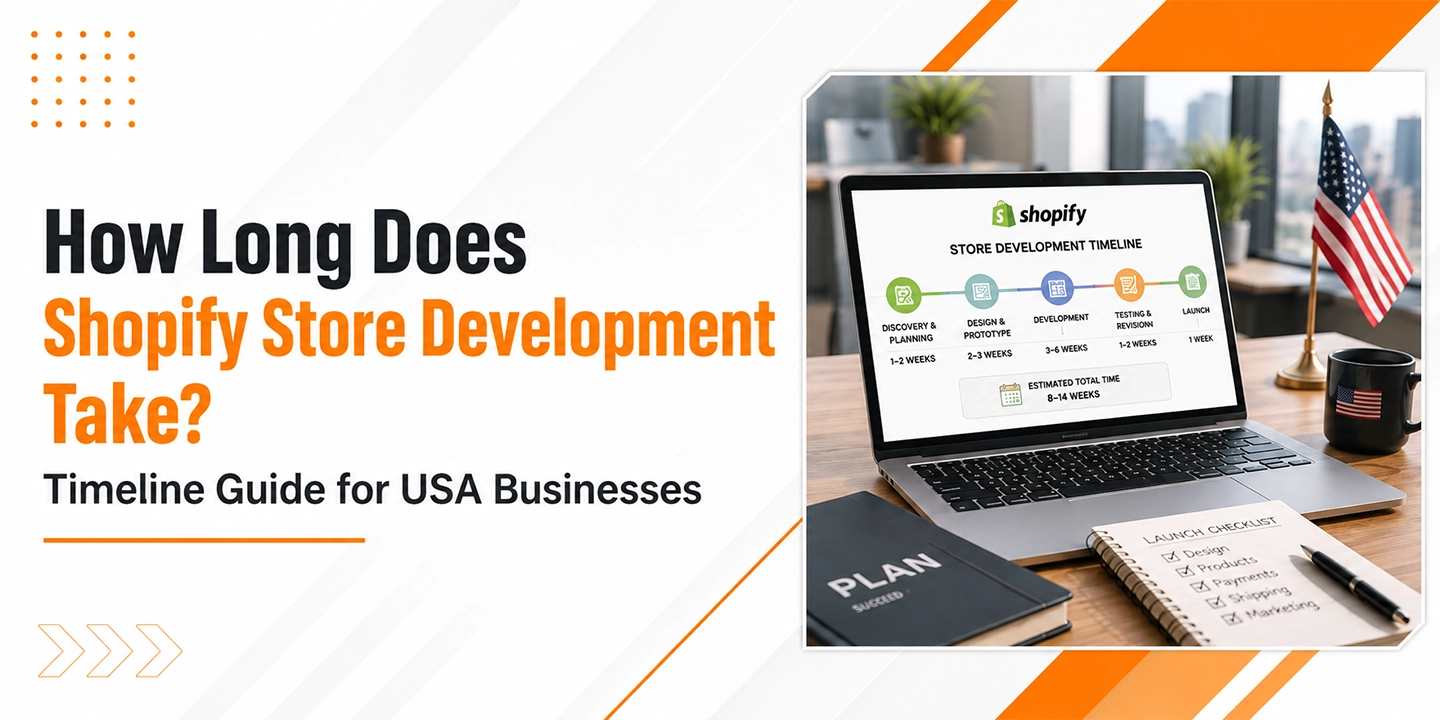

How Long Does Shopify Store Development Take? Timeline Guide for Businesses

If you’ve been searching for a straight answer to this question, you already know how frustrating the vague responses out there can be. “It depends” is technically true, but it’s not exactly useful when you’re trying to plan a product launch, allocate budget, or set expectations with your leadership team.

So let me give you something more actionable.

Shopify store development typically takes anywhere from 2 weeks to 6 months, depending on the complexity of the project, the size of your product catalog, the number of custom features required, and how quickly your internal team can provide content, assets, and approvals. Simple stores with a theme and a small catalog can go live in days. Enterprise-grade builds with custom integrations, multi-currency support, and B2B functionality? Those are multi-month projects.

This guide walks through every phase of the Shopify development timeline, what can speed things up, what commonly causes delays, and how to plan your project realistically.

Why the Timeline Question Matters More Than You Think

Ecommerce is not slowing down. According to Statista, global ecommerce sales are projected to surpass $8.1 trillion by 2026, up from $5.8 trillion in 2023. That kind of growth means that getting your Shopify store live quickly and correctly directly impacts revenue.

One thing many businesses overlook is that timeline planning is also competitive planning. If your competitors launch six weeks before you do, they’re capturing organic traffic, building customer reviews, and refining their conversion funnels while you’re still waiting on developer revisions. In a market where Shopify powers over 4.6 million live stores globally, according to Shopify’s own data, time-to-market isn’t just an operational concern. It’s a strategic one.

That said, rushing a launch creates its own problems. The Baymard Institute has documented through extensive usability research that poor checkout experiences alone account for a checkout abandonment rate of 70.19% on average. Launching fast with a broken or confusing UX can be worse than launching right on time with a polished experience.

The goal is a realistic timeline, not an optimistic one.

The 5 Phases of Shopify Store Development

Phase 1: Discovery and Planning (1 to 3 Weeks)

Before a single line of code gets written or a theme gets selected, there’s work that needs to happen at the strategy level. This phase often gets underestimated, especially by businesses eager to jump into design.

Discovery typically covers:

  • Business requirements: What products are you selling, who is your customer, what markets are you targeting?
  • Technical requirements: Do you need third-party integrations (ERP, CRM, shipping software)? Multi-currency? Wholesale pricing?
  • Platform decisions: Are you migrating from another platform like WooCommerce, Magento, or BigCommerce? Or starting fresh?
  • Content inventory: How many products do you have? Are descriptions and images ready?

From my experience, this phase is where most project delays are born. When a business hasn’t clearly defined its requirements upfront, scope creep becomes almost inevitable. A discovery phase that feels like it’s “slowing things down” is actually the single best investment in keeping the rest of your timeline on track.

For straightforward stores, this phase can compress to a week. For complex builds, three weeks is realistic, and for enterprise projects, it can run longer.

Phase 2: Design and UX (2 to 6 Weeks)

Once the scope is clear, design work begins. Here’s where Shopify gives you real flexibility, but also where the timeline can vary wildly.

Using an existing Shopify theme (with customizations): 1 to 2 weeks Custom theme design from scratch: 4 to 6 weeks or more

Shopify’s theme store offers over 100 professionally designed themes, and many businesses, especially those launching their first store or working with tighter budgets, get excellent results by starting with a paid theme and customizing it to match their brand. That’s a legitimate approach and it saves significant time.

Custom design work means creating wireframes, mockups, and prototypes before any development begins. You’ll be making decisions about navigation structure, product page layouts, mobile responsiveness, and brand consistency across every touchpoint.

That brings up something worth noting about mobile. According to Salesforce’s State of Commerce report, mobile devices account for a growing majority of ecommerce traffic, with some verticals seeing over 70% of visits from smartphones. Your Shopify theme or custom design needs to perform flawlessly on small screens. Cutting corners here is not an option.

Design review cycles are the biggest time variable in this phase. If your team can review and approve designs promptly, you stay on schedule. If reviews drag out over multiple revision rounds and involve multiple stakeholders with conflicting opinions, this phase can double in length.

Phase 3: Development and Build (2 to 12 Weeks)

This is the core of the Shopify development timeline, and the range is genuinely wide.

Here’s a rough breakdown by project type:

Project Type Development Time
Starter store (theme + basic setup) 1 to 2 weeks
Small business store (theme + moderate customization) 3 to 5 weeks
Mid-market store (custom theme or heavy customization) 6 to 10 weeks
Enterprise / Shopify Plus store 10 to 20+ weeks

What drives development time upward? A few key factors:

Custom functionality. If you need features that don’t exist natively in Shopify or its app ecosystem, a developer needs to build them. This includes things like custom product configurators, subscription management built from scratch, complex B2B pricing rules, or a fully custom checkout experience (available on Shopify Plus).

Third-party integrations. Connecting your Shopify store to an ERP system, a warehouse management system, a CRM like Salesforce or HubSpot, or a custom PIM (product information management) system adds significant development time. Each integration requires API work, testing, and error handling.

Product catalog complexity. A store with 50 products is very different from one with 5,000 SKUs across dozens of categories, each needing its own metafields, variant logic, and collection organization.

App configuration. Shopify’s app ecosystem is extensive, but configuring the right apps, making sure they don’t conflict with each other, and customizing their behavior to fit your needs takes real time.

Phase 4: Content Loading and QA (1 to 4 Weeks)

This phase is consistently underestimated, and it’s where projects that look almost done stall out for weeks.

Content loading involves importing your product catalog (titles, descriptions, images, prices, variants, metafields), setting up collections, writing page content, configuring your navigation menus, and making sure everything displays correctly across device types and browsers.

For smaller stores, this is manageable in a week. For stores with hundreds or thousands of products, especially when migrating from another platform, this can be an extended process involving data cleaning, CSV imports, and manual quality checks.

QA (quality assurance) testing then covers:

  • Cross-device and cross-browser testing
  • Checkout flow testing (including payment gateways)
  • Speed and performance testing
  • Broken link and redirect testing
  • Inventory sync validation

According to McKinsey research on digital transformation, inadequate testing before launch is one of the most common causes of post-launch revenue loss in ecommerce. A slow page load, a broken checkout step, or an incorrect shipping rate can all directly reduce conversion rates.

Phase 5: Launch and Post-Launch Stabilization (1 to 2 Weeks)

Launch day is exciting, but it’s not the finish line. The immediate post-launch period typically involves:

  • DNS migration and SSL certificate setup
  • Final domain configuration
  • Post-launch monitoring for errors
  • Speed optimization review
  • Analytics setup (Google Analytics 4, Shopify Analytics, heatmapping tools)
  • Payment processing final confirmation
  • Staff training on order management and fulfillment workflows

That’s where things change for many businesses. They treat launch as the end of the project. In reality, the first two to four weeks after launch are crucial for catching issues that only surface under real traffic conditions.

Budget at least a week for this stabilization period, and keep your developer available for quick fixes.

Shopify vs. Other Platforms: How Does the Timeline Compare?

Honestly, this is one of Shopify’s real strengths. Compared to Magento or a custom-built ecommerce solution, Shopify dramatically reduces development time.

Platform Typical Development Time
Shopify (standard) 4 to 12 weeks
Shopify Plus (enterprise) 12 to 24 weeks
WooCommerce (comparable scope) 8 to 16 weeks
Magento (comparable scope) 16 to 36 weeks
Custom build 6 months to 2+ years

Shopify’s hosted infrastructure, its built-in payment processing through Shopify Payments, and its curated app ecosystem all eliminate categories of development work that other platforms require. You’re not building a server stack, configuring hosting, or coding a payment gateway from scratch. That headstart is real.

According to Gartner’s research on digital commerce platforms, Shopify (and Shopify Plus for enterprise) consistently ranks highly for time-to-value, largely because of its out-of-the-box capabilities and the maturity of its partner ecosystem.

What Causes Shopify Projects to Run Over Timeline

In most cases, timeline overruns don’t come from the technology. They come from the process.

Delayed content delivery is the most common culprit. Development can only move so fast if it’s waiting on product images, copy, or brand assets from the client side. Every week of delay on content is a week added to the timeline.

Scope creep is a close second. A project that starts as “a simple Shopify store” gradually accumulates feature requests, design changes, and new integrations. Without a clearly defined scope and a formal change management process, timelines expand without a corresponding adjustment to budget or schedule.

Multiple revision cycles slow down design and development phases considerably. This is especially common in businesses where multiple stakeholders need to approve work, and those stakeholders have differing opinions.

Third-party dependencies can be surprisingly tricky. Waiting for an ERP vendor to provide API documentation, or a payment provider to complete merchant onboarding can hold up development that’s otherwise ready to proceed.

Platform migrations add complexity. Migrating from WooCommerce, BigCommerce, or Magento to Shopify involves data migration (customer records, order history, product data), URL redirect mapping for SEO preservation, and thorough testing to make sure nothing was lost or corrupted in the move.

How to Accelerate Your Shopify Development Timeline

A few things genuinely move the needle:

Have your content ready before development starts. Product descriptions, high-quality images, brand guidelines, and any existing assets should all be organized and ready to hand off. Waiting until development is complete to start gathering content is a major mistake.

Use a battle-tested Shopify theme. If custom design isn’t a hard requirement, starting with a premium Shopify theme and customizing it can shave weeks off your timeline.

Hire experienced Shopify developers. This sounds obvious, but the difference between a developer who has built 50 Shopify stores and one who is learning on your project is measured in weeks. Shopify’s partner directory and certified agency network are good places to start your search.

Limit the MVP scope. Launch with the core features your customers actually need. Everything else can be added after launch. Getting a working store live in 8 weeks is almost always better than getting a perfect store live in 20 weeks.

Establish a clear approval process. Know who the final decision-makers are before the project starts. Waiting five days for a design approval that should take two hours is a systemic issue that compounds across every phase.

Shopify Plus: What Changes at the Enterprise Level

Shopify Plus is Shopify’s enterprise offering, designed for high-volume merchants, global brands, and businesses with complex operational requirements. As of 2024, Shopify Plus powers brands like Gymshark, Allbirds, and thousands of others doing significant revenue.

The development timeline for Shopify Plus projects is notably longer for a few reasons:

Custom checkout experiences. Shopify Plus merchants can customize the checkout using Checkout Extensibility, which requires specialized development work.

Multi-store and international setups. Many Shopify Plus implementations involve multiple storefronts for different regions, languages, and currencies, each requiring its own configuration.

Headless commerce. Some enterprise brands use Shopify as a commerce backend with a custom-built frontend (often called headless commerce). This approach offers maximum flexibility in design and performance but adds significant development time. A headless Shopify build might run 4 to 6 months.

ERP and custom systems integration. Enterprise businesses often run complex backend systems that need to talk to Shopify. These integrations require careful API work and extensive testing.

A realistic timeline for a full Shopify Plus implementation with custom integrations and multi-regional setup is 4 to 6 months.

B2B Ecommerce on Shopify: Additional Considerations

B2B (business-to-business) ecommerce adds its own layer of complexity to any development timeline.

According to Forrester Research, B2B ecommerce in the US alone is projected to reach $3 trillion by 2027. Many manufacturers, distributors, and wholesalers are now moving significant portions of their order volume online, and Shopify has been building out its B2B capabilities substantially, especially on the Plus tier.

B2B-specific features that impact the development timeline include:

  • Custom pricing by customer account or company
  • Minimum order quantities and pack sizing
  • Net payment terms (Net 30, Net 60)
  • Company accounts with multiple buyers and approval workflows
  • Custom catalogs visible only to specific buyer segments
  • Integration with existing ERP or distributor management systems

A B2B Shopify implementation typically adds 4 to 8 weeks to a comparable B2C project timeline, sometimes more depending on the complexity of pricing logic and systems integration.

A Realistic Shopify Development Timeline at a Glance

Phase Simple Store Mid-Market Store Enterprise / Plus
Discovery and Planning 1 week 2 weeks 3 to 4 weeks
Design and UX 1 to 2 weeks 3 to 4 weeks 6 to 8 weeks
Development 1 to 2 weeks 5 to 8 weeks 10 to 16 weeks
Content and QA 1 week 2 to 3 weeks 4 to 6 weeks
Launch and Stabilization 1 week 1 week 2 weeks
Total Estimate 5 to 7 weeks 13 to 18 weeks 25 to 36 weeks

These are conservative, realistic estimates based on typical project conditions. Your actual timeline may be shorter with excellent preparation and fast approvals, or longer with scope changes and delays.

Final Thoughts

There’s no universal answer to how long Shopify store development takes, but there is a realistic one for your specific situation. The key is being honest about your requirements, your content readiness, your approval process, and the complexity of what you’re building.

From my experience, businesses that invest time in proper discovery and planning before a single design mockup is created consistently deliver their projects closer to the original timeline and budget than those who rush into execution.

Shopify is genuinely one of the fastest paths to a professional, scalable ecommerce store. The platform has earned its market position. But the timeline is still a function of preparation, complexity, and process, not just the technology.

If you’re planning a Shopify project, use this guide as a starting point. Then get specific about your requirements and talk to experienced Shopify professionals who can give you an honest assessment based on what you’re actually building.

What Is Shopify Development? A Complete Guide for US Business Owners

If you’ve been thinking about launching or growing an online store, you’ve almost certainly come across Shopify. But there’s a big difference between signing up for a Shopify plan and actually building a high-performing ecommerce store. That’s where Shopify development comes in — and honestly, it’s one of the most important decisions you’ll make as a business owner.

This guide breaks down exactly what Shopify development is, what it involves, what it costs, and how to find the right people to help you build a store that actually drives revenue.

What Is Shopify Development?

Shopify development refers to the process of building, customizing, and maintaining an online store on the Shopify platform. It goes beyond simply choosing a theme. It includes custom design, app integrations, backend logic, performance tuning, and ongoing technical support to create a store that fits your specific business needs.

Out of the box, Shopify gives you the foundation. Shopify development gives you the structure built on top of that foundation — one that reflects your brand, supports your operations, and is engineered to convert visitors into buyers.

According to Shopify’s own data, Shopify powers over 4.5 million businesses in more than 175 countries. That scale tells you the platform is battle-tested. But it also means standing out requires more than a default template.

What Does Shopify Development Actually Include?

When most people say “Shopify development,” they’re talking about a broad category of work. Here’s what falls under that umbrella:

1. Custom Theme Development

Every Shopify store uses a theme as its visual foundation. You can buy a pre-built theme from the Shopify Theme Store, but custom theme development means building or heavily modifying a theme using Shopify’s templating language — Liquid — along with HTML, CSS, and JavaScript.

Custom themes are built when:

  • Your brand has specific design requirements that pre-built themes can’t accommodate
  • You need unique page layouts, product display logic, or navigation structures
  • You want faster load times by stripping out unnecessary code from bloated templates

A well-built custom theme can dramatically affect conversion rates. According to Baymard Institute, the average large-scale ecommerce site has around 67 documented UX issues — many of which are fixable through thoughtful design and development.

2. Shopify App Development and Integration

Shopify has a powerful app ecosystem with over 8,000 apps. Sometimes you need an existing app connected to your store. Other times, no existing app does exactly what you need, and a developer builds a custom one.

App development in Shopify typically covers:

  • Custom loyalty or rewards systems
  • Advanced inventory management tools
  • Specialized checkout experiences
  • B2B pricing and account management portals
  • Custom reporting dashboards

3. Shopify Plus Development

Shopify Plus is the enterprise tier of the platform, designed for high-volume merchants. Development at this level opens up additional capabilities like:

  • Checkout customization using Checkout Extensibility
  • Launchpad for automated campaigns
  • Flow for complex workflow automation
  • Multi-store management across international markets

Gartner has consistently noted that enterprise-level ecommerce platforms are seeing increased adoption among mid-market businesses — and Shopify Plus is one of the biggest beneficiaries of that shift.

4. Headless Shopify Development

Headless commerce separates the frontend (what customers see) from the backend (where data lives). With headless Shopify, developers use Shopify’s Storefront API to pull product and checkout data into a custom-built frontend using frameworks like Next.js or Nuxt.js.

This approach gives brands full creative control and can deliver near-instant page load times. The tradeoff is higher development cost and more complex maintenance.

5. Migration to Shopify

If your business is moving from another platform — WooCommerce, Magento, BigCommerce, or a custom-built system — Shopify development includes data migration, URL mapping, SEO preservation, and integration setup.

According to Statista, US ecommerce revenue is projected to surpass $1.7 trillion by 2027. Businesses that delay platform improvements risk losing ground to competitors who’ve already invested in better infrastructure.

Shopify Development Services in the USA: What to Expect

The US market for Shopify development services has matured significantly. You’ll find a wide range of providers, from solo freelancers to large agencies with dedicated Shopify practices.

Types of Shopify Development Services Available

Design and UX: Creating wireframes, mockups, and final designs tailored to your brand.

Frontend Development: Translating those designs into Liquid templates, with clean, performant code.

Backend and App Development: Building custom functionality that doesn’t exist in the app store.

Shopify Plus Configuration: Setting up enterprise features, custom checkout flows, and multi-store architecture.

Ongoing Maintenance and Support: Keeping your store updated, patching issues, and adding features over time.

Conversion Rate Optimization (CRO): Analyzing where visitors drop off and making data-driven improvements.

One thing many businesses overlook is post-launch support. A store isn’t a one-time project — it’s a living digital asset. The best Shopify development partnerships include ongoing retainers for maintenance and iteration.

How Much Does Shopify Development Cost?

Pricing is probably the question most US business owners have when they start exploring this. The honest answer is: it depends on what you’re building. But here are some realistic ranges based on current market rates.

Project Type Estimated Cost Range
Basic theme customization $1,500 – $5,000
Custom theme development $8,000 – $30,000
Full store build (mid-market) $15,000 – $60,000
Shopify Plus implementation $30,000 – $150,000+
Custom app development $10,000 – $75,000+
Headless Shopify build $50,000 – $200,000+
Platform migration $5,000 – $40,000

These ranges reflect US-based agency pricing. Freelancers, particularly those working offshore, often charge less — but you trade speed and accountability for lower rates.

From my experience, the biggest mistake business owners make is focusing only on the upfront build cost. You also need to factor in:

  • Shopify monthly plan fees ($39 to $2,000+ per month depending on tier)
  • App subscription costs ($0 to $500+/month depending on your stack)
  • Ongoing development retainer ($1,500 to $10,000/month for active iteration)

Forbes reports that the average ecommerce business spends between 7% and 12% of its revenue on technology and development. If you’re doing $1M a year in online sales, a $70,000 to $120,000 annual technology budget is within industry norms.

Agency vs. Freelancer: Which Is Right for You?

This is one of the most common decisions US business owners face when starting a Shopify project. There’s no universal right answer, but there are clear patterns.

When a Freelancer Makes Sense

  • You have a small budget (under $10,000)
  • The project is narrowly scoped and well-defined
  • You have internal team members who can manage the relationship and QA the work
  • You don’t need ongoing support or a long-term partner

When a Shopify Development Agency Makes Sense

  • Your project is complex, involving custom functionality, migrations, or integrations
  • You need a team (designer + developer + project manager) rather than one person
  • You’re building on Shopify Plus or going headless
  • You want accountability, defined timelines, and a support structure post-launch

The thing is, a freelancer might be a great developer but unavailable when you hit a critical issue at 9pm before a product launch. Agencies typically have processes, escalation paths, and dedicated support built in.

McKinsey’s research on digital experience consistently points to operational reliability as a key differentiator for digital service providers — and that applies directly to how you choose a development partner.

How to Choose a Shopify Development Partner in the USA

Here’s a practical framework for evaluating agencies or freelancers before you commit:

1. Check Their Shopify Partner Status

Shopify has an official Partner Program. Agencies listed as Shopify Partners have demonstrated competence on the platform. Look for partners with Plus Partner status if you’re building on Shopify Plus.

2. Review Their Portfolio with a Critical Eye

Don’t just look at pretty screenshots. Ask to see stores they’ve built that are live and performing. Look for:

  • Page load speeds (test with Google PageSpeed Insights)
  • Mobile responsiveness
  • Logical navigation and checkout flow
  • Evidence of custom work, not just out-of-the-box themes

3. Ask the Right Questions

Before signing anything, ask potential partners:

  • What does your discovery and scoping process look like?
  • How do you handle project changes mid-build?
  • Who owns the code after the project is complete?
  • What does post-launch support look like, and what does it cost?
  • Have you worked with businesses in my industry?

4. Evaluate Communication and Process

A technically skilled team with poor communication will cause you frustration and cost you money. Ask about their project management tools (Basecamp, Linear, Jira), how often you’ll have check-ins, and how they handle feedback cycles.

5. Request References

Ask for two or three client references from projects similar to yours in size and scope. A reputable agency will provide these without hesitation.

Shopify Development for Different Business Types

You’ll notice that Shopify gets used very differently depending on the kind of business running on it. Here’s how development priorities shift by business type:

Direct-to-Consumer (DTC) Brands

DTC brands typically need strong brand storytelling, fast-loading product pages, and optimized checkout flows. Development focus is usually on custom theme work, email marketing integrations, and post-purchase upsell flows.

B2B Ecommerce

According to Salesforce’s State of Commerce report, 65% of B2B buyers prefer to self-serve through digital channels for at least part of the buying journey. Shopify Plus has B2B features built in, but custom development is often needed for:

  • Net terms and invoice-based checkout
  • Customer-specific pricing catalogs
  • Quote request workflows
  • Account hierarchy management

Multi-Brand or Multi-Store Operations

Businesses running multiple brands or regional storefronts (US, Canada, UK, etc.) need architecture planning around Shopify’s multi-store setup. Development in this context is heavier and more strategic.

Wholesale and Retail Hybrid

If you sell both direct to consumers and through retail or wholesale channels, Shopify development needs to accommodate different pricing rules, product visibility settings, and account types — often using a combination of Shopify Plus’s B2B features and custom apps.

Shopify Website Development Best Practices

Whether you’re hiring a team or managing a project yourself, these principles apply to any well-executed Shopify build:

Performance first. Google’s research shows that a one-second delay in mobile page load time can reduce conversions by up to 20%. Every Shopify build should be tested for Core Web Vitals before launch.

Mobile-first design. According to eMarketer, mobile commerce accounted for over 43% of US ecommerce sales in 2024. Designing for desktop first is designing for the minority of your customers.

SEO structure from the start. Clean URL structures, proper heading hierarchy, structured data markup, and fast load times aren’t afterthoughts — they should be baked into the build.

Accessibility matters. ADA compliance for ecommerce is increasingly a legal consideration in the US. Development should include proper alt text, keyboard navigation, and color contrast standards.

Integration planning. Your store doesn’t exist in isolation. It connects to your ERP, 3PL, email platform, CRM, and advertising accounts. Planning integrations early prevents expensive rework later.

Shopify E-Commerce Development Trends in 2025

The US ecommerce landscape is evolving fast, and Shopify development is keeping pace. A few trends worth knowing:

AI-powered personalization. Shopify has introduced Sidekick, its AI commerce assistant. Third-party tools are increasingly offering AI-based product recommendations, dynamic pricing, and customer segmentation.

One-page and accelerated checkout. Shopify’s Shop Pay and one-page checkout have significantly improved checkout completion rates. Development work now includes optimizing for these flows rather than building around them.

Composable commerce. More enterprise brands are moving toward headless and composable architectures, pulling the best tools together through APIs rather than relying on a single monolithic platform.

Sustainability features. According to Deloitte’s research, 32% of US consumers have stopped purchasing from brands they perceive as unsustainable. Shopify’s Planet app and carbon-neutral shipping options are increasingly being built into stores.

Final Thoughts

Shopify development isn’t a commodity purchase. It’s an investment in the infrastructure your business runs on. Done well, it pays back in better conversion rates, lower operational friction, and a brand experience that builds customer trust over time.

The US market has no shortage of Shopify developers and agencies. The challenge is finding the right fit for your specific situation — your industry, your complexity, your budget, and your growth plans.

Take your time with the selection process. Ask hard questions. Check references. And treat the relationship with your development partner the same way you’d treat any critical business relationship: with clear expectations, open communication, and a long-term mindset.

If you’re just getting started or re-evaluating your current setup, the frameworks in this guide should give you a solid foundation for making a smarter decision.