
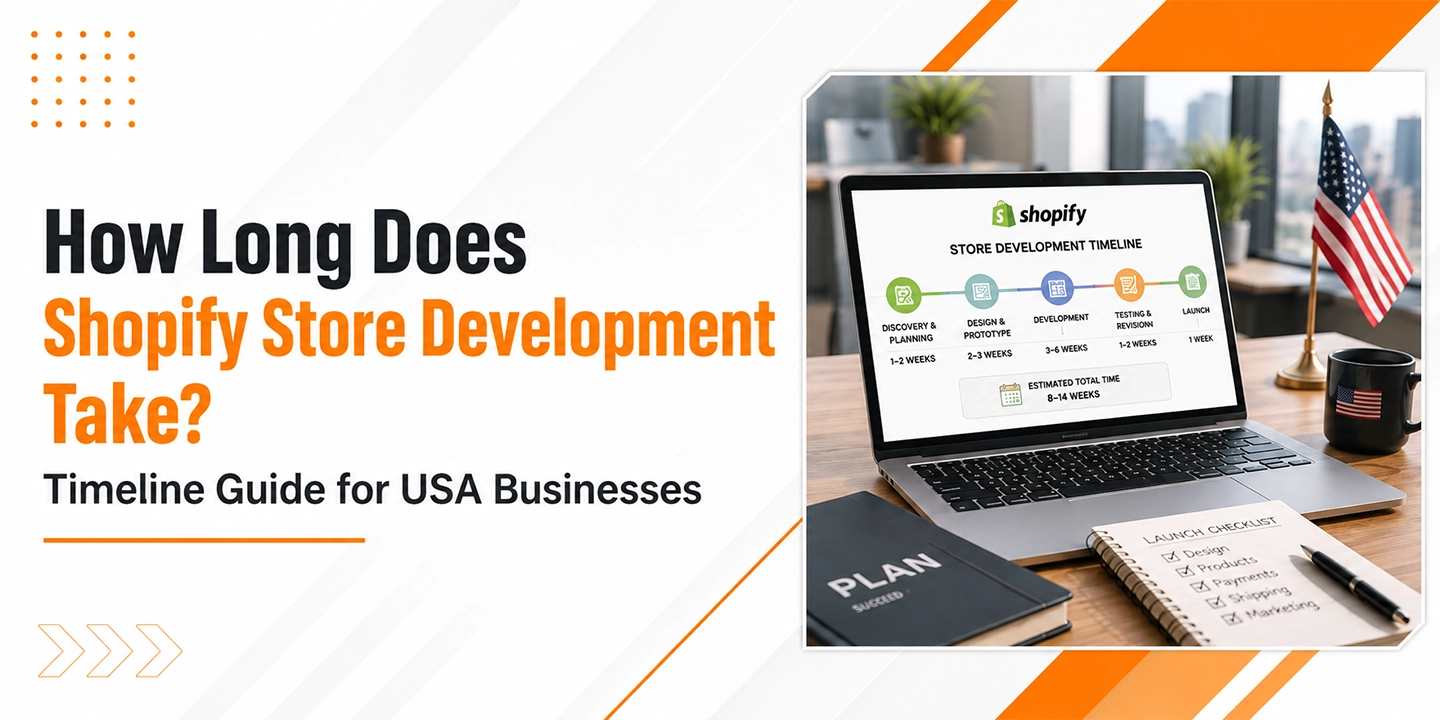
If you’ve been searching for a straight answer to this question, you already know how frustrating the vague responses out there can be. “It depends” is technically true, but it’s not exactly useful when you’re trying to plan a product launch, allocate budget, or set expectations with your leadership team.
So let me give you something more actionable.
Shopify store development typically takes anywhere from 2 weeks to 6 months, depending on the complexity of the project, the size of your product catalog, the number of custom features required, and how quickly your internal team can provide content, assets, and approvals. Simple stores with a theme and a small catalog can go live in days. Enterprise-grade builds with custom integrations, multi-currency support, and B2B functionality? Those are multi-month projects.
This guide walks through every phase of the Shopify development timeline, what can speed things up, what commonly causes delays, and how to plan your project realistically.
Why the Timeline Question Matters More Than You Think
Ecommerce is not slowing down. According to Statista, global ecommerce sales are projected to surpass $8.1 trillion by 2026, up from $5.8 trillion in 2023. That kind of growth means that getting your Shopify store live quickly and correctly directly impacts revenue.
One thing many businesses overlook is that timeline planning is also competitive planning. If your competitors launch six weeks before you do, they’re capturing organic traffic, building customer reviews, and refining their conversion funnels while you’re still waiting on developer revisions. In a market where Shopify powers over 4.6 million live stores globally, according to Shopify’s own data, time-to-market isn’t just an operational concern. It’s a strategic one.
That said, rushing a launch creates its own problems. The Baymard Institute has documented through extensive usability research that poor checkout experiences alone account for a checkout abandonment rate of 70.19% on average. Launching fast with a broken or confusing UX can be worse than launching right on time with a polished experience.
The goal is a realistic timeline, not an optimistic one.
The 5 Phases of Shopify Store Development
Phase 1: Discovery and Planning (1 to 3 Weeks)
Before a single line of code gets written or a theme gets selected, there’s work that needs to happen at the strategy level. This phase often gets underestimated, especially by businesses eager to jump into design.
Discovery typically covers:
- Business requirements: What products are you selling, who is your customer, what markets are you targeting?
- Technical requirements: Do you need third-party integrations (ERP, CRM, shipping software)? Multi-currency? Wholesale pricing?
- Platform decisions: Are you migrating from another platform like WooCommerce, Magento, or BigCommerce? Or starting fresh?
- Content inventory: How many products do you have? Are descriptions and images ready?
From my experience, this phase is where most project delays are born. When a business hasn’t clearly defined its requirements upfront, scope creep becomes almost inevitable. A discovery phase that feels like it’s “slowing things down” is actually the single best investment in keeping the rest of your timeline on track.
For straightforward stores, this phase can compress to a week. For complex builds, three weeks is realistic, and for enterprise projects, it can run longer.
Phase 2: Design and UX (2 to 6 Weeks)
Once the scope is clear, design work begins. Here’s where Shopify gives you real flexibility, but also where the timeline can vary wildly.
Using an existing Shopify theme (with customizations): 1 to 2 weeks Custom theme design from scratch: 4 to 6 weeks or more
Shopify’s theme store offers over 100 professionally designed themes, and many businesses, especially those launching their first store or working with tighter budgets, get excellent results by starting with a paid theme and customizing it to match their brand. That’s a legitimate approach and it saves significant time.
Custom design work means creating wireframes, mockups, and prototypes before any development begins. You’ll be making decisions about navigation structure, product page layouts, mobile responsiveness, and brand consistency across every touchpoint.
That brings up something worth noting about mobile. According to Salesforce’s State of Commerce report, mobile devices account for a growing majority of ecommerce traffic, with some verticals seeing over 70% of visits from smartphones. Your Shopify theme or custom design needs to perform flawlessly on small screens. Cutting corners here is not an option.
Design review cycles are the biggest time variable in this phase. If your team can review and approve designs promptly, you stay on schedule. If reviews drag out over multiple revision rounds and involve multiple stakeholders with conflicting opinions, this phase can double in length.
Phase 3: Development and Build (2 to 12 Weeks)
This is the core of the Shopify development timeline, and the range is genuinely wide.
Here’s a rough breakdown by project type:
| Project Type | Development Time |
| Starter store (theme + basic setup) | 1 to 2 weeks |
| Small business store (theme + moderate customization) | 3 to 5 weeks |
| Mid-market store (custom theme or heavy customization) | 6 to 10 weeks |
| Enterprise / Shopify Plus store | 10 to 20+ weeks |
What drives development time upward? A few key factors:
Custom functionality. If you need features that don’t exist natively in Shopify or its app ecosystem, a developer needs to build them. This includes things like custom product configurators, subscription management built from scratch, complex B2B pricing rules, or a fully custom checkout experience (available on Shopify Plus).
Third-party integrations. Connecting your Shopify store to an ERP system, a warehouse management system, a CRM like Salesforce or HubSpot, or a custom PIM (product information management) system adds significant development time. Each integration requires API work, testing, and error handling.
Product catalog complexity. A store with 50 products is very different from one with 5,000 SKUs across dozens of categories, each needing its own metafields, variant logic, and collection organization.
App configuration. Shopify’s app ecosystem is extensive, but configuring the right apps, making sure they don’t conflict with each other, and customizing their behavior to fit your needs takes real time.
Phase 4: Content Loading and QA (1 to 4 Weeks)
This phase is consistently underestimated, and it’s where projects that look almost done stall out for weeks.
Content loading involves importing your product catalog (titles, descriptions, images, prices, variants, metafields), setting up collections, writing page content, configuring your navigation menus, and making sure everything displays correctly across device types and browsers.
For smaller stores, this is manageable in a week. For stores with hundreds or thousands of products, especially when migrating from another platform, this can be an extended process involving data cleaning, CSV imports, and manual quality checks.
QA (quality assurance) testing then covers:
- Cross-device and cross-browser testing
- Checkout flow testing (including payment gateways)
- Speed and performance testing
- Broken link and redirect testing
- Inventory sync validation
According to McKinsey research on digital transformation, inadequate testing before launch is one of the most common causes of post-launch revenue loss in ecommerce. A slow page load, a broken checkout step, or an incorrect shipping rate can all directly reduce conversion rates.
Phase 5: Launch and Post-Launch Stabilization (1 to 2 Weeks)
Launch day is exciting, but it’s not the finish line. The immediate post-launch period typically involves:
- DNS migration and SSL certificate setup
- Final domain configuration
- Post-launch monitoring for errors
- Speed optimization review
- Analytics setup (Google Analytics 4, Shopify Analytics, heatmapping tools)
- Payment processing final confirmation
- Staff training on order management and fulfillment workflows
That’s where things change for many businesses. They treat launch as the end of the project. In reality, the first two to four weeks after launch are crucial for catching issues that only surface under real traffic conditions.
Budget at least a week for this stabilization period, and keep your developer available for quick fixes.
Shopify vs. Other Platforms: How Does the Timeline Compare?
Honestly, this is one of Shopify’s real strengths. Compared to Magento or a custom-built ecommerce solution, Shopify dramatically reduces development time.
| Platform | Typical Development Time |
| Shopify (standard) | 4 to 12 weeks |
| Shopify Plus (enterprise) | 12 to 24 weeks |
| WooCommerce (comparable scope) | 8 to 16 weeks |
| Magento (comparable scope) | 16 to 36 weeks |
| Custom build | 6 months to 2+ years |
Shopify’s hosted infrastructure, its built-in payment processing through Shopify Payments, and its curated app ecosystem all eliminate categories of development work that other platforms require. You’re not building a server stack, configuring hosting, or coding a payment gateway from scratch. That headstart is real.
According to Gartner’s research on digital commerce platforms, Shopify (and Shopify Plus for enterprise) consistently ranks highly for time-to-value, largely because of its out-of-the-box capabilities and the maturity of its partner ecosystem.
What Causes Shopify Projects to Run Over Timeline
In most cases, timeline overruns don’t come from the technology. They come from the process.
Delayed content delivery is the most common culprit. Development can only move so fast if it’s waiting on product images, copy, or brand assets from the client side. Every week of delay on content is a week added to the timeline.
Scope creep is a close second. A project that starts as “a simple Shopify store” gradually accumulates feature requests, design changes, and new integrations. Without a clearly defined scope and a formal change management process, timelines expand without a corresponding adjustment to budget or schedule.
Multiple revision cycles slow down design and development phases considerably. This is especially common in businesses where multiple stakeholders need to approve work, and those stakeholders have differing opinions.
Third-party dependencies can be surprisingly tricky. Waiting for an ERP vendor to provide API documentation, or a payment provider to complete merchant onboarding can hold up development that’s otherwise ready to proceed.
Platform migrations add complexity. Migrating from WooCommerce, BigCommerce, or Magento to Shopify involves data migration (customer records, order history, product data), URL redirect mapping for SEO preservation, and thorough testing to make sure nothing was lost or corrupted in the move.
How to Accelerate Your Shopify Development Timeline
A few things genuinely move the needle:
Have your content ready before development starts. Product descriptions, high-quality images, brand guidelines, and any existing assets should all be organized and ready to hand off. Waiting until development is complete to start gathering content is a major mistake.
Use a battle-tested Shopify theme. If custom design isn’t a hard requirement, starting with a premium Shopify theme and customizing it can shave weeks off your timeline.
Hire experienced Shopify developers. This sounds obvious, but the difference between a developer who has built 50 Shopify stores and one who is learning on your project is measured in weeks. Shopify’s partner directory and certified agency network are good places to start your search.
Limit the MVP scope. Launch with the core features your customers actually need. Everything else can be added after launch. Getting a working store live in 8 weeks is almost always better than getting a perfect store live in 20 weeks.
Establish a clear approval process. Know who the final decision-makers are before the project starts. Waiting five days for a design approval that should take two hours is a systemic issue that compounds across every phase.
Shopify Plus: What Changes at the Enterprise Level
Shopify Plus is Shopify’s enterprise offering, designed for high-volume merchants, global brands, and businesses with complex operational requirements. As of 2024, Shopify Plus powers brands like Gymshark, Allbirds, and thousands of others doing significant revenue.
The development timeline for Shopify Plus projects is notably longer for a few reasons:
Custom checkout experiences. Shopify Plus merchants can customize the checkout using Checkout Extensibility, which requires specialized development work.
Multi-store and international setups. Many Shopify Plus implementations involve multiple storefronts for different regions, languages, and currencies, each requiring its own configuration.
Headless commerce. Some enterprise brands use Shopify as a commerce backend with a custom-built frontend (often called headless commerce). This approach offers maximum flexibility in design and performance but adds significant development time. A headless Shopify build might run 4 to 6 months.
ERP and custom systems integration. Enterprise businesses often run complex backend systems that need to talk to Shopify. These integrations require careful API work and extensive testing.
A realistic timeline for a full Shopify Plus implementation with custom integrations and multi-regional setup is 4 to 6 months.
B2B Ecommerce on Shopify: Additional Considerations
B2B (business-to-business) ecommerce adds its own layer of complexity to any development timeline.
According to Forrester Research, B2B ecommerce in the US alone is projected to reach $3 trillion by 2027. Many manufacturers, distributors, and wholesalers are now moving significant portions of their order volume online, and Shopify has been building out its B2B capabilities substantially, especially on the Plus tier.
B2B-specific features that impact the development timeline include:
- Custom pricing by customer account or company
- Minimum order quantities and pack sizing
- Net payment terms (Net 30, Net 60)
- Company accounts with multiple buyers and approval workflows
- Custom catalogs visible only to specific buyer segments
- Integration with existing ERP or distributor management systems
A B2B Shopify implementation typically adds 4 to 8 weeks to a comparable B2C project timeline, sometimes more depending on the complexity of pricing logic and systems integration.
A Realistic Shopify Development Timeline at a Glance
| Phase | Simple Store | Mid-Market Store | Enterprise / Plus |
| Discovery and Planning | 1 week | 2 weeks | 3 to 4 weeks |
| Design and UX | 1 to 2 weeks | 3 to 4 weeks | 6 to 8 weeks |
| Development | 1 to 2 weeks | 5 to 8 weeks | 10 to 16 weeks |
| Content and QA | 1 week | 2 to 3 weeks | 4 to 6 weeks |
| Launch and Stabilization | 1 week | 1 week | 2 weeks |
| Total Estimate | 5 to 7 weeks | 13 to 18 weeks | 25 to 36 weeks |
These are conservative, realistic estimates based on typical project conditions. Your actual timeline may be shorter with excellent preparation and fast approvals, or longer with scope changes and delays.
Final Thoughts
There’s no universal answer to how long Shopify store development takes, but there is a realistic one for your specific situation. The key is being honest about your requirements, your content readiness, your approval process, and the complexity of what you’re building.
From my experience, businesses that invest time in proper discovery and planning before a single design mockup is created consistently deliver their projects closer to the original timeline and budget than those who rush into execution.
Shopify is genuinely one of the fastest paths to a professional, scalable ecommerce store. The platform has earned its market position. But the timeline is still a function of preparation, complexity, and process, not just the technology.
If you’re planning a Shopify project, use this guide as a starting point. Then get specific about your requirements and talk to experienced Shopify professionals who can give you an honest assessment based on what you’re actually building.