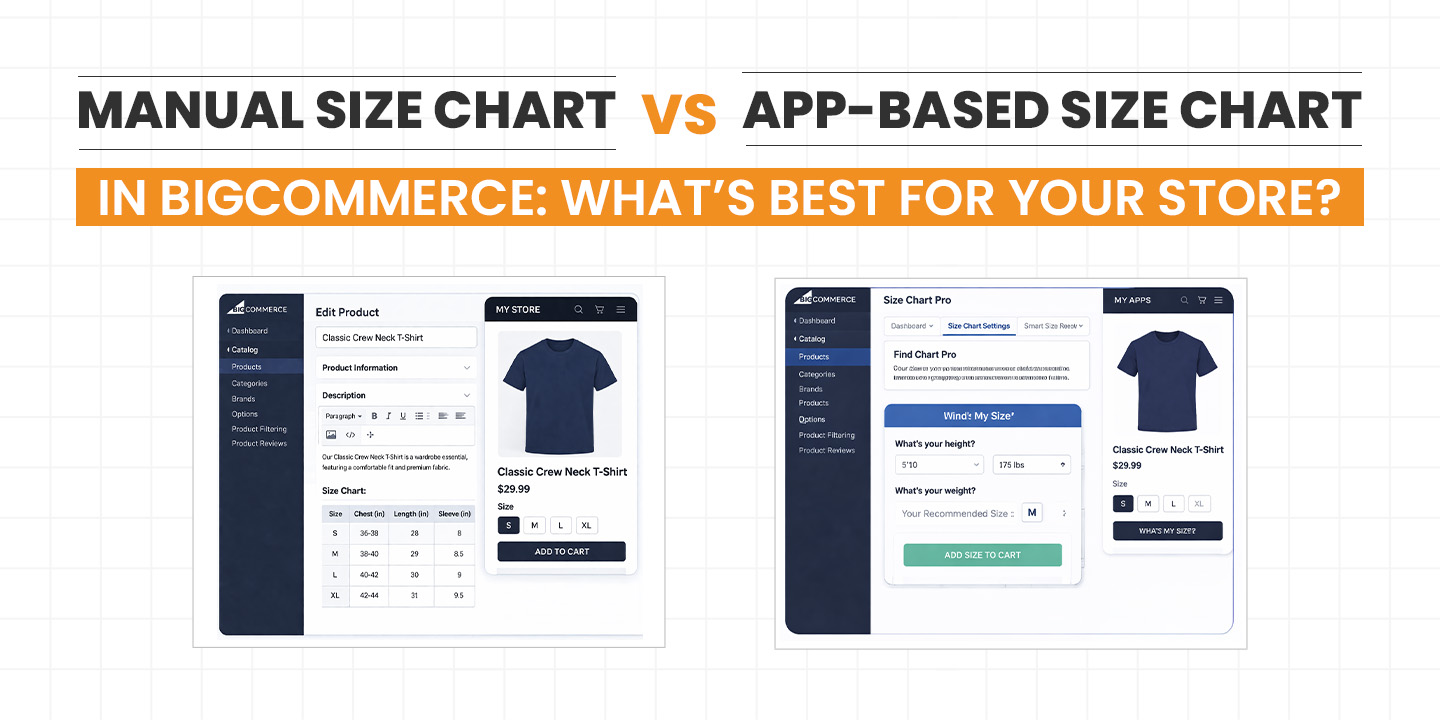
Manual Size Chart vs App-Based Size Chart in BigCommerce: What’s Best for Your Store?

If you’re running an apparel or product-based store on BigCommerce, you already know one thing for sure: sizing can make or break your conversions. Customers hesitate when they’re unsure, and hesitation often leads to abandoned carts.

So the big question is not whether you need a size chart. You definitely do. The real question is how you should implement it.

Should you go with a simple manual size chart added directly to your product pages? Or should you invest in a BigCommerce Size Chart App that automates and improves the experience?

Let’s break this down in a way that actually helps you decide what’s right for your store, not just what sounds good in theory.

Why Size Charts Matter More Than You Think

Before we compare anything, let’s quickly talk about why size charts are such a big deal.

When customers shop online, they don’t have the luxury of trying things on. That means they rely entirely on the information you provide. If your sizing information is unclear, missing, or hard to find, you’re basically asking them to take a risk.

And most people don’t like taking risks with their money.

A clear and easy-to-access size chart helps you:

  • Reduce return rates
  • Increase customer confidence
  • Improve conversion rates
  • Build trust with first-time buyers

So yes, adding a size chart is not optional anymore. It’s a necessity.

What is a Manual Size Chart in BigCommerce?

A manual size chart is exactly what it sounds like. You create and add the size chart yourself using product descriptions, custom fields, images, or HTML tables.

Most store owners use one of these methods:

  • Adding a table directly in the product description
  • Uploading a size chart image
  • Creating a separate size guide page and linking it

This is the traditional way to Add Size Chart to BigCommerce Product Page, and it’s still widely used.

Pros of Manual Size Charts

1. Full Control Over Content

You can design your size chart exactly how you want. No restrictions, no templates, no limitations.

2. No Extra Cost

You don’t need to pay for any app subscription. This is especially helpful if you’re just starting out or working with a tight budget.

3. Simple Setup

If you have basic knowledge of BigCommerce, you can set it up quickly without relying on external tools.

Cons of Manual Size Charts

Now here’s where things start getting tricky.

1. Not User-Friendly

Most manual charts sit inside the product description. Customers have to scroll, search, and sometimes zoom in to read them. That’s not a great experience.

2. No Popup Option

You can’t easily create a Size chart popup BigCommerce experience without custom coding. And let’s be honest, not everyone wants to get into that.

3. Hard to Manage at Scale

If you have 50 or 100 products, updating size charts manually becomes a headache. One small change means editing multiple pages.

4. Not Mobile Optimized

Tables and images don’t always look good on mobile devices. And a large chunk of your traffic is probably coming from mobile.

What is a BigCommerce Size Chart App?

A BigCommerce Size Chart App is a tool that lets you create, manage, and display size charts in a much smarter way.

Instead of manually adding charts to each product, you can:

  • Create reusable size chart templates
  • Assign them to multiple products
  • Display them as popups or tabs
  • Customize the look and feel

Some apps are built specifically for clothing stores, often referred to as a BigCommerce Apparel Size Chart App, but they can also be used for other product categories.

Pros of Using a Size Chart App

1. Better User Experience

This is probably the biggest advantage.

Instead of cluttering your product page, you can show a clean button like “View Size Chart.” When clicked, it opens a Size chart popup BigCommerce style window.

It feels smooth, modern, and easy to use.

2. Easy to Manage Multiple Products

Let’s say you sell t-shirts, jeans, and jackets. With an app, you can create different charts and assign them to product categories.

No need to manually update each product.

3. Mobile-Friendly Design

Most apps are built with mobile users in mind. The charts adjust automatically to different screen sizes.

That means better readability and fewer frustrated customers.

4. Saves Time in the Long Run

Yes, it might take a little time to set up initially. But once done, managing size charts becomes effortless.

5. Advanced Features

Many apps come with features like:

  • Measurement unit switching
  • Custom styling
  • Conditional display
  • Integration with product variants

These are things you simply can’t achieve easily with manual methods.

Cons of Using a Size Chart App

Let’s keep it real. Apps are not perfect.

1. Additional Cost

Most apps come with a monthly fee. It may not be huge, but it’s still an extra expense.

2. Learning Curve

You’ll need to spend some time understanding how the app works. It’s not difficult, but it’s not instant either.

3. Dependency on Third-Party Tools

You’re relying on an external app. If the app has issues or gets discontinued, you may need to find an alternative.

Manual vs App-Based Size Chart: A Side-by-Side Comparison

Let’s simplify things.

Manual Size Chart works best if:

  • You have a small product catalog
  • You don’t update size charts frequently
  • You want a zero-cost solution
  • You’re okay with a basic user experience

App-Based Size Chart works best if:

  • You have multiple products or categories
  • You want a clean and modern UI
  • You care about mobile experience
  • You want to reduce manual work
  • You’re serious about scaling your store

Real Talk: What Actually Works Better?

If you’re just testing your store or selling a handful of products, a manual size chart is fine. No need to overcomplicate things.

But if you’re running a serious ecommerce business, especially in fashion or apparel, manual methods start to feel outdated very quickly.

Customers today expect a smooth experience. They don’t want to scroll through long descriptions or struggle with poorly formatted tables.

This is where a BigCommerce Apparel Size Chart App really shines.

It doesn’t just show information. It improves how customers interact with your store.

How Size Charts Impact Conversions

Let’s connect this to business outcomes.

When customers clearly understand sizing:

  • They are more likely to buy
  • They feel more confident
  • They trust your brand more

On the flip side, unclear sizing leads to:

  • Cart abandonment
  • Higher return rates
  • Negative reviews

A well-placed Size chart popup BigCommerce setup removes friction from the buying process. And less friction usually means more sales.

When Should You Upgrade to an App?

Here are some clear signs that it’s time to move from manual to app-based size charts:

  • You’re adding new products regularly
  • Customers are asking about sizing
  • You’re getting returns due to wrong sizes
  • Your product pages feel cluttered
  • You want to improve mobile experience

If you’re ticking even two or three of these, it’s worth considering a BigCommerce Size Chart App.

Tips to Get the Most Out of Your Size Chart

Whether you go manual or app-based, these tips will help you do it right:

Keep It Simple

Avoid overloading your chart with too much data. Focus on what customers actually need.

Be Consistent

Use the same format across all products. Consistency builds trust.

Add Measurement Instructions

Tell customers how to measure themselves. A simple guide can make a big difference.

Use Clear Labels

Avoid confusing terms. Keep everything easy to understand.

Test on Mobile

Always check how your size chart looks on mobile devices.

Final Verdict: Which One Should You Choose?

If we’re being honest, both options have their place.

Manual size charts are great for simplicity and cost-saving. But they come with limitations that become more obvious as your store grows.

On the other hand, a BigCommerce Size Chart App gives you flexibility, scalability, and a much better user experience. It’s not just a feature upgrade, it’s a usability upgrade.

So here’s the straightforward answer:

  • Go manual if you’re just starting out
  • Go with an app if you’re planning to grow

Closing Thoughts

At the end of the day, your goal is to make shopping as easy as possible for your customers.

If they can quickly find the right size, they’re more likely to buy. It’s that simple.

So don’t treat size charts as a small detail. It’s one of those things that quietly impacts your sales more than you realize.

Whether you choose to Add Size Chart to BigCommerce Product Page manually or through a BigCommerce Apparel Size Chart App, just make sure it’s clear, accessible, and user-friendly.

Because in ecommerce, even small improvements can lead to big results.
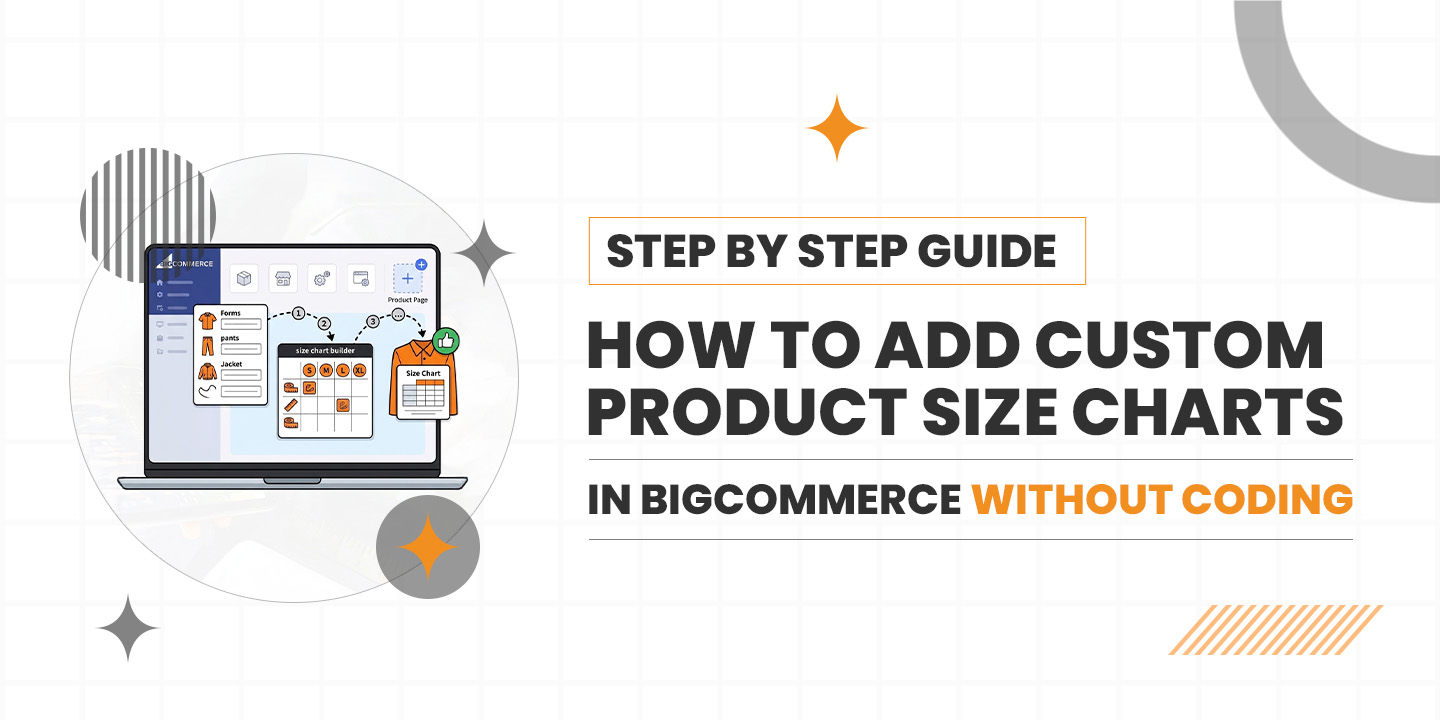
How to Add Custom Product Size Charts in BigCommerce Without Coding

Imagine this: You’ve spent weeks perfecting your apparel line. The fabric is right, the photography is stunning, and the marketing is finally bringing people to your BigCommerce store. A customer finds a jacket they love, they hover over the “Add to Cart” button, but then they pause.

“Is a Medium going to fit me, or should I go Large?”

Without a clear answer, they close the tab. That’s a lost sale, and in the competitive world of e-commerce in 2026, those lost moments add up fast. Most store owners think they need to be a coding wizard or pay a developer hundreds of dollars to fix this. Good news: you don’t. You can actually add a size chart to the BigCommerce product page without touching a single line of CSS or HTML.

Let’s walk through how to get this done so your customers can shop with total confidence.

Why Size Charts Are Your Best Salesperson

In the fashion and gear world, a size chart isn’t just a utility; it’s a trust builder. When you provide a Custom size chart BigCommerce users can rely on, you’re doing two things:

  1. Reducing the “will it fit?” anxiety.
  2. Slashing your return rates (which kills your margins).

Google’s SGE (Search Generative Experience) now looks for “helpful content” that solves user problems directly. By having a clear, accessible size guide, you’re telling search engines that your store provides a great user experience.

The Secret Sauce: Using a BigCommerce Size Chart App

While you could try to build a table in the product description editor, it usually ends up looking messy on mobile. The easiest way to get a professional look is to use a dedicated BigCommerce Size Chart App.

These apps act like a “plug and play” system. You install it, pick a design, and it handles the heavy lifting. Here is the step-by-step roadmap to getting your charts live today.

Step 1: Choosing the Right Tool

Head over to the BigCommerce App Marketplace. You’ll find several options, but you want to look for a BigCommerce apparel size chart app that specifically mentions “no-code” and “mobile responsive.”

A good BigCommerce size guide app should allow you to:

  • Create different charts for different categories (Men’s, Women’s, Accessories).
  • Use a size chart pop-up BigCommerce feature so it doesn’t clutter the page.
  • Handle the bulk size chart assignment for BigCommerce so you don’t have to manually add it to 500 different shirts.

Step 2: Creating Your First Chart

Once you’ve picked your BigCommerce clothing size chart app, open the dashboard. Usually, you’ll start by creating a “Template.”

Instead of starting from zero, most apps give you presets. If you’re selling t-shirts, pick the t-shirt preset. You can then edit the measurements to match your specific brand. This is where you create that Custom size guide BigCommerce shoppers appreciate. Pro tip: Include both inches and centimeters to help your international buyers.

Step 3: Design for the Eyes (and Fingers)

In 2026, almost everyone is shopping on their phone while waiting for coffee. If your chart is a giant, unreadable image, people will leave.

This is why a responsive size chart, the BigCommerce tool, is vital. It adjusts the table to fit the screen. When designing, keep the colors simple and make sure the “Size Guide” link is placed right next to the size selection dropdown. Using a size chart plugin, BigCommerce makes this placement automatic.

Step 4: The Magic of Bulk Assignment

Imagine having to click every single product to attach a chart. Nobody has time for that. Look for the bulk size chart assignment BigCommerce feature within your app.

You can usually set “Rules.” For example: “Apply the ‘Summer Dress’ size chart to every product in the ‘Dresses’ category.” Just like that, your whole store is updated in seconds. This is the most efficient way to add a size chart to a BigCommerce store without losing your mind.

Step 5: Testing the “Size Chart Popup BigCommerce” Experience

Before you go live, check a product page. Click the link. Does the size chart pop-up BigCommerce load quickly? Is it easy to close?

The popup style is usually better than an inline table because it keeps the product page clean and focused on the “Buy” button. If it looks good, you’re ready to start converting those hesitant browsers into buyers.

Leveling Up Your Store Strategy

Using a BigCommerce product size chart tool is a small change that yields big results. But don’t stop there.

Why SGE Cares About Your Size Guide

Search engines are getting smarter. When someone searches for “best fitting yoga pants,” Google wants to recommend stores that actually help the user find their fit. By using a BigCommerce size chart integration, you are adding structured data to your site. This helps AI-driven search results understand that you are a high-quality, reliable merchant.

Beyond the Basics: BigCommerce Clothing Size Chart Tool

If you sell more than just clothes, like hats, shoes, or even pet gear, your BigCommerce clothing size chart tool can usually be adapted. A Custom size chart, BigCommerce isn’t restricted to “Small, Medium, Large.” You can create charts for “Neck Circumference” or “Insole Length.” The more specific you are, the more your customers will trust you.

Conclusion: Stop Coding, Start Selling

The era of needing a developer for every small change is over. By leveraging a BigCommerce size chart app, you give your customers the tools they need to make a fast decision.

It keeps your site looking professional, helps your SEO rankings in an SGE world, and most importantly, it makes life easier for your shoppers. So, head to the marketplace, find a BigCommerce size guide app that fits your vibe, and get those charts live. Your return folder (and your customers) will thank you.

How Fashion Brands on BigCommerce Can Reduce Return Rates Using a Size Chart App

The online fashion industry continues to grow rapidly, but with that growth comes a persistent challenge high return rates. Unlike many other product categories, clothing purchases rely heavily on fit and comfort. When customers cannot physically try on an item, they depend entirely on the information provided on the product page. If that information is unclear or incomplete, sizing mistakes become common.

Incorrect sizing does more than inconvenience shoppers. It directly affects profitability, operational efficiency, and brand reputation. For fashion brands selling on BigCommerce, adopting smarter tools like a BigCommerce Size Chart App can significantly reduce return rates and improve the overall shopping experience.

Why Return Rates Are High in Online Fashion Stores

Sizing confusion remains the biggest reason for fashion returns. Inconsistent standards, unclear measurement charts, and customer assumptions lead to wrong purchases, higher refunds, operational stress, and declining customer trust.

Sizing Inconsistencies Across Brands

One of the biggest reasons for returns in fashion e-commerce is the lack of universal sizing standards. A “Medium” in one brand may fit like a “Small” or “Large” in another. Even within the same brand, sizing can vary depending on the collection, fabric type, or manufacturing batch.

Different fits such as slim, regular, relaxed, and oversized add another layer of complexity. Customers may assume their usual size will work, but the actual fit often tells a different story. Without clear guidance, they make purchasing decisions based on guesswork.

Lack of Clear Product Measurements

Many online stores rely on generic size guides that apply to all products. These static charts often lack specific garment measurements such as chest width, sleeve length, shoulder width, or inseam details. When detailed body measurement references are missing, customers cannot confidently compare the product with their own measurements.

A BigCommerce clothing size chart tool allows brands to move beyond one-size-fits-all charts and provide detailed, product-level sizing information that reduces confusion.

Customer Guesswork & Assumptions

In the absence of precise measurement details, customers fall back on assumptions. They order their “usual size” without verifying whether the product runs small or large. This behavior increases the likelihood of returns.

Additionally, many product pages do not include visual measurement guidance. Without illustrations showing how to measure bust, waist, hips, or inseam correctly, even well-intentioned customers may measure incorrectly. Clear, visual guidance is essential to reduce sizing-related errors.

The Cost of Returns for BigCommerce Fashion Brands

Returns impact profitability, operations, and brand image. From reverse shipping to refund management, high return rates reduce margins and create avoidable stress for growing fashion businesses.

Financial Losses

Returns are expensive. Reverse logistics alone can significantly reduce profit margins. Shipping costs, return handling, quality checks, repackaging, and restocking all add up quickly.

When items cannot be resold as new due to damage or wear, brands face additional losses. Over time, high return rates erode profitability and make scaling more difficult. By implementing a Responsive size chart BigCommerce solution, brands can prevent many of these unnecessary costs before they occur.

Operational Challenges

Returns also create operational strain. Inventory management becomes complicated when returned products are reintroduced into stock. Miscounts and delays can disrupt order fulfillment processes.

Customer support teams must handle return requests, size exchange queries, and refund follow-ups. This increases workload and diverts attention from growth-focused tasks. Reducing size-related returns helps streamline operations and improve efficiency.

Impact on Customer Experience

Beyond financial and operational costs, returns impact customer perception. Refund delays and exchange complications can frustrate buyers. Negative reviews often mention poor fit or unclear sizing information.

When customers lose trust in sizing accuracy, they hesitate to reorder. A seamless and informative sizing experience builds confidence and strengthens long-term relationships.

What Is an Easy Size Chart App?

An easy size chart app is a smart solution that helps fashion brands display accurate and organized sizing information directly on their product pages. Instead of adding static tables manually inside descriptions, merchants can manage dynamic, structured charts from a single dashboard. The main purpose of a BigCommerce Size Chart App is to remove sizing confusion and help customers confidently select the right fit before completing their purchase.

Advanced Functionalities

  • Responsive design – A Responsive size chart BigCommerce layout ensures charts display perfectly on mobile, tablet, and desktop devices.

  • Auto unit conversion – Automatically switch between centimeters and inches to support both domestic and international shoppers.

  • Clean popup display – Size charts open in a sleek, mobile-friendly popup on the product page, keeping customers engaged without page redirection.

  • Bulk assignment options – Assign one chart to multiple products, categories, or brands to maintain consistency and save time.

  • Smart exclusion control – Exclude specific products from category-based charts to avoid incorrect sizing information.

  • Fully customizable design – Create structured tables, add text, and insert images to build a Custom size chart BigCommerce layout that matches your brand identity.

  • User-friendly dashboard – Easily Add size chart to BigCommerce store products, update measurements, and manage charts without any coding knowledge.

How a Size Chart App Reduces Return Rates

Accurate sizing tools eliminate guesswork. When customers understand measurements clearly, they select correct sizes initially, reducing exchanges and improving overall purchasing confidence.

Provides Product-Level Accuracy

Different categories require different measurement details. For example, a slim-fit shirt needs detailed chest and shoulder measurements, while trousers require waist, hip, and inseam information.

A BigCommerce Size Chart App allows brands to provide accurate, product-level data instead of relying on generalized guides. Fabric stretch, fit type, and cut variations can be addressed within each chart.

This level of specificity reduces uncertainty and minimizes incorrect orders.

Builds Customer Confidence

When customers see a clear measurement breakdown, they feel more confident in their selection. Detailed charts communicate professionalism and transparency.

Reduced sizing confusion directly lowers the likelihood of returns. Shoppers who trust your sizing information are more likely to complete their purchase without hesitation.

Improves Purchase Decisions

Including size recommendations, fit notes, and model references further enhances clarity. For example, stating that “The model is 5’8” and wearing size Small” provides context.

When customers understand how a product fits relative to body type, they make more informed decisions. A reliable BigCommerce clothing size chart tool turns sizing from a risk into a reassurance.

Why BigCommerce Is Ideal for Size Chart Integration

BigCommerce offers flexible app integrations, making it simple for fashion brands to implement advanced sizing tools without technical complexity.

Easy App Integration

BigCommerce offers a flexible app ecosystem that allows seamless integration of specialized tools. Adding a size chart solution typically requires no coding expertise.

With a few simple steps, merchants can Add size chart to BigCommerce store and start assigning charts to products. Quick product mapping ensures that each item displays the correct sizing information.

Customization Flexibility

Brand identity matters in fashion. Size charts should align with the store’s visual style. BigCommerce supports design customization, allowing merchants to adjust fonts, colors, and placement.

A Custom size chart BigCommerce tool enables brands to display charts as popups, tabs, or inline sections. This flexibility ensures a clean user experience without cluttering product pages.

Scalable for Growing Fashion Brands

As product catalogs expand, managing sizing information manually becomes inefficient. BigCommerce supports large inventories, and integrated size chart apps can scale accordingly.

Whether a brand sells 50 products or 5,000, a Responsive size chart BigCommerce solution ensures consistent, accurate information across all categories.

Best Practices for Using a Size Chart App Effectively

Simply installing a size chart is not enough. Strategic usage ensures maximum accuracy, improved conversions, and reduced return rates.

Use Category-Specific Charts

Avoid using the same chart for every product. Separate charts for men’s, women’s, and kids’ collections improve accuracy. Within these groups, further segmentation by product type enhances clarity.

For example:

  • T-shirts and shirts

  • Dresses and skirts

  • Jeans and trousers

  • Jackets and outerwear

Each category should reflect its unique measurement requirements.

Add Visual Measurement Guides

Text-based tables alone may not be enough. Include diagrams showing how to measure bust, waist, hips, and inseam correctly. Visual instructions reduce measurement errors.

A well-designed BigCommerce clothing size chart tool can include illustrative graphics that improve understanding and reduce ambiguity.

Keep Charts Updated

Sizing may evolve due to supplier changes or seasonal fit adjustments. Regularly review return data to identify patterns. If customers frequently report that an item runs small, update the chart or add a fit note.

Consistent updates ensure that your sizing information remains accurate and trustworthy.

Real Impact: Measurable Benefits for Fashion Stores

Accurate size guidance leads to lower return rates, improved conversions, and stronger customer loyalty, positively impacting long-term brand growth.

Reduced Return Percentage

When customers choose the correct size the first time, size-related returns decrease significantly. Even a modest reduction in returns can result in substantial cost savings over time.

Using a BigCommerce Size Chart App transforms size clarity into a proactive strategy for return prevention.

Higher Conversion Rates

Clear sizing information reduces hesitation at checkout. Shoppers who feel confident are more likely to complete their purchase.

A transparent and accessible Custom size chart BigCommerce solution enhances trust, which positively impacts conversion rates.

Increased Customer Loyalty

Positive sizing experiences encourage repeat purchases. Customers who consistently receive well-fitting products develop brand loyalty.

When brands successfully Add size chart to BigCommerce store and maintain accurate data, they create a reliable shopping experience that customers value.

Conclusion

High return rates remain a major challenge for online fashion brands. Inconsistent sizing, unclear measurement guides, and customer guesswork all contribute to unnecessary exchanges and refunds.

Accurate sizing is more important than ever in 2026 e-commerce. By implementing a reliable and Responsive size chart BigCommerce solution, brands can reduce returns, improve customer satisfaction, and protect profitability.

A well-designed size chart app is not just a helpful feature—it is a strategic investment that supports long-term growth for BigCommerce fashion stores.

Why E-Commerce Stores on BigCommerce Need a Professional Size Chart Solution

Online shopping has grown rapidly, but sizing remains one of the biggest challenges for customers buying clothing, footwear, and apparel online. Without the ability to try products physically, shoppers depend entirely on sizing information provided on product pages. When stores fail to provide clear measurements, customers often feel uncertain and may either abandon their purchase or order the wrong size. This is why many merchants now rely on a BigCommerce Size Chart App to provide accurate sizing details. When businesses Add Size Chart to BigCommerce Product Page, it improves buying confidence, reduces returns, and creates a smoother shopping experience for customers browsing apparel products online.

The Growing Problem of Returns in Online Stores

Online retailers face increasing return rates, especially in fashion. Most returns occur due to incorrect sizing. A BigCommerce Apparel Size Chart App helps reduce size confusion and prevent costly product returns.

Size-Related Returns – The #1 Issue

Product returns are one of the biggest challenges faced by online retailers, especially in fashion and apparel. Studies consistently show that incorrect sizing is the number one reason for returns. When customers order clothing that doesn’t fit properly, they are forced to return the product and order another size.

For businesses selling apparel, footwear, or sportswear, the lack of a BigCommerce Apparel Size Chart App can lead to major operational issues.Customers rely heavily on accurate measurements before making a purchase decision. Without a clear Custom size chart BigCommerce solution, shoppers are simply guessing their size.

Returns also create significant hidden costs for businesses. Reverse logistics involves shipping, inspection, repackaging, and restocking items. These costs quickly add up and can reduce profit margins. By implementing a BigCommerce size chart integration, store owners can help customers choose the correct size before purchasing.

Using a professional Size chart plugin BigCommerce ensures that shoppers see clear measurements, reducing guesswork and minimizing unnecessary returns.

Customer Trust and Brand Reputation

Customer trust plays a critical role in the success of any e-commerce business. When shoppers receive products that don’t fit correctly, they often feel disappointed or misled. This frequently results in negative reviews, refund requests  and poor brand perception.

For apparel businesses, accurate sizing information is just as important as product quality. When a store fails to Add Size Chart to BigCommerce Product Page, customers may feel uncertain about ordering. This hesitation directly affects conversion rates.

Negative experiences caused by poor sizing guidance can also prevent repeat purchases. A shopper who receives the wrong size once may hesitate to buy from the same store again. Implementing a size chart popup BigCommerce feature helps customers quickly view measurements without leaving the product page.

A well-designed BigCommerce Size Chart App builds transparency. Customers feel confident that the brand is providing clear guidance. This trust encourages repeat purchases and strengthens long-term customer relationships.

Why Default Size Charts Are Not Enough

Generic size charts often fail to match brand-specific sizing standards. A Custom size chart BigCommerce solution allows merchants to provide accurate measurements and improve customer confidence before completing purchases.

Generic Templates Don’t Fit Every Brand

Many e-commerce platforms provide basic size chart templates, but these generic charts rarely meet the needs of modern online stores. Every brand has its own sizing standards, especially in fashion and apparel.

For example, one brand’s “Medium” might be another brand’s “Small.” Without a Custom size chart BigCommerce solution, customers cannot accurately determine the correct size. A professional BigCommerce size chart integration allows merchants to create brand-specific sizing guides tailored to their products.

Lack of Customization for Different Product Categories

Different product categories require different measurement guides. For example:

  • T-shirts need chest and shoulder measurements
  • Jeans require waist and inseam measurements
  • Footwear requires foot length and width

Default size charts cannot handle this level of customization. A BigCommerce Apparel Size Chart App allows store owners to create product-specific charts for each category.

When merchants add size chart to BigCommerce Product Page, they can display the most relevant sizing information for that specific product. This reduces confusion and improves customer satisfaction.

Poor Mobile Responsiveness and User Experience

More than half of online shopping now happens on mobile devices. Unfortunately, many default size charts are not optimized for smaller screens.

Customers often struggle to zoom in, scroll through tables, or interpret measurements on mobile devices. A professional size chart popup BigCommerce solution ensures that charts are fully responsive and easy to read on any device.

A modern BigCommerce Size Chart App provides a smooth user experience with clear layouts and interactive charts that work perfectly on smartphones and tablets.

Limited Measurement Formats

Another limitation of default charts is the lack of flexible measurement formats. International customers may prefer different units such as centimeters or inches.

A professional Size chart plugin BigCommerce can include:

  • Unit conversions
  • Measurement diagrams
  • Visual guides for body measurements

These features make it easier for customers to understand sizing instructions. With proper BigCommerce size chart integration, shoppers receive clear information regardless of their location.

What Is an Easy Size Chart Solution?

An easy size chart solution is a tool designed to help online merchants provide clear, accurate, and easy-to-access sizing information for their products. For stores running on BigCommerce, using a BigCommerce Size Chart App can simplify the process of creating and managing size charts across multiple products. Instead of relying on static tables or manually adding sizing details for each product, merchants can use a Size chart plugin BigCommerce solution that integrates directly with their store.

A professional BigCommerce apparel size chart app allows merchants to design size charts that match their products and brand style. Whether a store sells clothing, footwear, or sportswear, merchants can create tailored sizing guides that help customers choose the correct fit. When businesses Add Size Chart to BigCommerce Product Page, customers gain immediate access to sizing information, reducing confusion and improving buying confidence.

Key Features of Easy Size Chart

  • Customizable Size Charts
    Create fully flexible size charts using text, tables, and images to match your product requirements and brand style with a Custom size chart BigCommerce setup. 
  • Product-Specific Charts
    Assign different charts to different products, categories, or brands using a BigCommerce Apparel Size Chart App, ensuring accurate measurements for each product type. 
  • Bulk Assignment for Faster Setup
    Save time by assigning one size chart to multiple products at once through a BigCommerce size chart integration, instead of adding charts manually to every item. 
  • Smart Exclusion Controls
    Easily exclude certain products from a category or brand chart to maintain clean and relevant Size chart plugin BigCommerce management.

  • Popup Display on Product Pages
    Use a size chart popup BigCommerce feature that allows customers to view measurements instantly without leaving the product page.

  • Mobile-Responsive Design
    Ensure size charts are easy to read and navigate on smartphones and tablets using a responsive BigCommerce Size Chart App interface.

  • No Coding Required
    Quickly Add Size Chart to BigCommerce Product Page without any coding or theme modifications using a simple and intuitive dashboard.

  • Seamless Store Integration
    The Size chart plugin BigCommerce integrates smoothly with your store theme, providing a consistent and professional shopping experience.

Benefits of Using an Easy Size Chart on BigCommerce

Using a Size chart plugin BigCommerce helps reduce returns, improve customer confidence, and increase conversions by providing clear measurements directly on product pages.

Reduced Return Rates

One of the biggest advantages of implementing a BigCommerce Apparel Size Chart App is reducing product returns.

When customers clearly understand product measurements, they are less likely to order the wrong size. A well-designed custom size chart BigCommerce solution provides detailed measurements that help shoppers make accurate decisions.

A size chart popup BigCommerce also allows customers to quickly double-check measurements before completing their purchase.

Increased Conversion Rates

Uncertainty is one of the main reasons shoppers abandon their carts. When sizing information is unclear, customers hesitate to complete their purchase.

By using a BigCommerce Size Chart App, store owners eliminate this uncertainty. When merchants Add Size Chart to BigCommerce Product Page, customers feel more confident selecting the correct size.

This leads to faster purchase decisions and higher conversion rates.

Improved Customer Experience

Providing accurate sizing guidance significantly improves the overall shopping experience.

A professional Size chart plugin BigCommerce can include:

  • Visual measurement diagrams
  • Detailed fitting instructions
  • Easy-to-read tables

With proper BigCommerce size chart integration, customers receive all the information they need without leaving the product page.

Stronger Brand Credibility

A professional size chart demonstrates that a brand values transparency and customer satisfaction.

When a store uses a Custom size chart BigCommerce solution, it shows attention to detail and commitment to customer experience.

Shoppers trust stores that provide clear product information. Implementing a BigCommerce Size Chart App helps build credibility and encourages repeat purchases.

Industries That Benefit the Most

Several industries rely heavily on accurate sizing information. Implementing a BigCommerce Apparel Size Chart App is especially beneficial for the following sectors.

Fashion & Apparel

Clothing stores require detailed measurement guides. A Custom size chart BigCommerce helps customers select the correct fit for shirts, dresses, jackets, and more.

Footwear

Foot sizing varies across regions and brands. A size chart popup BigCommerce allows customers to compare their foot measurements with available sizes.

Sportswear

Athletic clothing requires precise measurements for performance and comfort. A BigCommerce Size Chart App helps athletes choose the right fit for sportswear products.

Kidswear

Children’s clothing sizes change frequently as kids grow. A Size chart plugin BigCommerce allows parents to select sizes based on accurate body measurements.

Custom Tailored Products

Stores offering tailored clothing or made-to-order products require detailed measurement guides. A BigCommerce size chart integration ensures customers provide accurate measurements before ordering.

Why BigCommerce Stores Specifically Need Advanced Size Chart Tools

Growing stores with large catalogs need efficient sizing tools. A BigCommerce Size Chart App helps manage multiple charts easily while allowing merchants to Add Size Chart to BigCommerce Product Page seamlessly.

Scaling Product Catalogs

As e-commerce businesses grow, their product catalogs become larger and more complex. Stores may carry multiple brands, collections, and product types.

Managing size information manually becomes difficult. A professional BigCommerce Size Chart App allows merchants to organize charts efficiently.

With a size chart plugin BigCommerce, store owners can create reusable charts and assign them to multiple products. This simplifies management and ensures consistency across the store.

Automated BigCommerce size chart integration also helps merchants update sizing guides quickly when product specifications change.

Customization Flexibility

Brand identity plays a crucial role in e-commerce design. Generic charts often look out of place on modern websites.

A Custom size chart BigCommerce solution allows merchants to fully customize the appearance of size charts. Store owners can match fonts, colors, layouts, and design elements with their brand.

A well-designed size chart popup BigCommerce blends seamlessly with the store interface. This creates a polished and professional shopping experience.

Integration with Product Pages

Another major advantage of advanced tools is seamless integration with product pages.

When merchants Add Size Chart to BigCommerce Product Page, customers can instantly access sizing information without navigating away from the product. This keeps shoppers engaged and focused on completing the purchase.

A modern BigCommerce Apparel Size Chart App loads quickly and does not slow down the website. Fast loading times are essential for maintaining strong user experience and search engine rankings.

With a reliable BigCommerce size chart integration, size guides become an integral part of the shopping journey.

Conclusion

Sizing clarity is essential for any successful online store, especially in fashion and apparel. Without accurate measurements, customers hesitate to buy or frequently return products due to incorrect sizing. Implementing a professional BigCommerce Size Chart App helps merchants provide detailed and reliable size information. When store owners Add Size Chart to BigCommerce Product Page, they improve customer confidence and simplify the buying process. A well-designed Custom size chart BigCommerce solution not only enhances the shopping experience but also reduces return rates and increases conversions. Investing in a proper BigCommerce size chart integration ensures long-term growth, better customer satisfaction, and stronger trust in your brand.