
Google Ads Campaign Summary & Reporting Automation
Automatically collects, processes, and summarizes monthly Google Ads campaigns into ready-to-use reports.
Client / Department Overview
Client Type
Digital Marketing Services, Performance Marketing Organization, Growth Marketing Agency
Department
Marketing Analytics / Paid Ads Management
Tools Involved
n8n, Google Ads, Google Sheets
The Challenge

The marketing team lacked a centralized, automated system to monitor Google Ads campaign performance. Without automation, decision-making was delayed and opportunities for optimization were frequently missed.
Campaign metrics were scattered across multiple reports. Analysts had to manually collect data for spend, clicks, impressions, conversions, CTR, CPA, CPC and ROAS, which was time-consuming and prone to mistakes.
Key Pain Points
-
1
Fragmented Campaign Data
-
2
High Manual Effort Every Month
-
3
Delayed and Inconsistent Reporting
-
4
Limited Visibility for Strategic Decisions
The Automation Solution
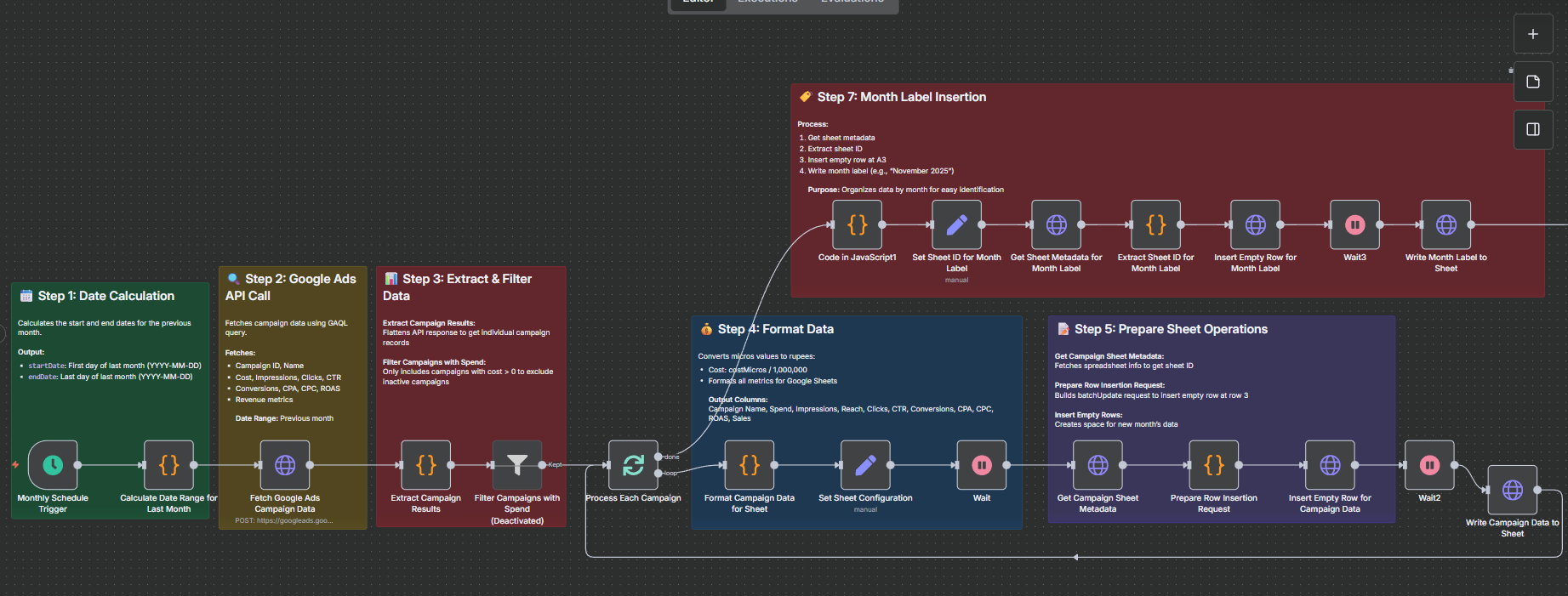
An automated Google Ads reporting system that runs monthly on the 1st to collect the previous month’s campaign performance data from Google Ads. The automation processes and formats campaign-level metrics and writes them into Google Sheets with clear month labels. A summary workflow then calculates monthly totals and averages (spend, clicks, conversions, etc.) and writes a consolidated summary for easy tracking and analysis.
Monthly trigger and date calculation
Runs automatically on the 1st of each month at 7 AM (IST). Calculates the previous month’s start and end dates in YYYY-MM-DD format.
Fetch Google Ads data via Google Ads API
Calls the Google Ads API endpoint using a GAQL query to retrieve campaign performance metrics such as cost, impressions, clicks, CTR, conversions, CPA, CPC, ROAS, and revenue for the calculated date range.
Extract and process campaigns
Extracts campaign-level results from the API response and processes each campaign individually to ensure complete and accurate reporting.
Format data
Converts cost values from micros to rupees (cost/1,000,000) and formats all metrics for Google Sheets, including Campaign Name, Spend, Impressions, Reach, Clicks, CTR, Conversions, CPA, CPC, ROAS and Sales.
Insert month label and write campaign data
Inserts a new row to mark the reporting month (e.g., “November 2025”) and writes each campaign’s formatted data into the Google Campaigns sheet using the Google Sheets API.
Calculate and write monthly summary
The workflow reads all campaign data from the Google Sheets file, groups entries by month, and calculates key performance metrics. It computes totals for spend, clicks, conversions and sales, while averaging metrics such as impressions, reach, CTR, CPC, CPA and ROAS. It also derives the conversion rate to provide deeper performance insights. The fully formatted monthly summary is then written to the Google PPC Summary sheet using the Google Sheets API for easy tracking and analysis.
Workflow Diagram
The Impact
Significant Time Savings
Eliminated manual data exports and calculations, saving 8–10 hours every month for the marketing team.
Improved Accuracy & Consistency
Automated data extraction and calculations reduced human errors and ensured consistent, standardized reporting across all campaigns.
Faster Decision-Making
Monthly reports are generated on schedule, enabling teams to identify performance trends and optimization opportunities without delays.
Better Visibility into Campaign Performance
Centralized campaign-level data and monthly summaries in Google Sheets made it easier to track spend, ROI, and overall campaign effectiveness over time.
Before vs After Snapshot
| Activity | Before Automation | After AI Workflow |
|---|---|---|
| Data Collection | Manual export from Google Ads time-consuming and repetitive | Automatic API-based fetch of previous month’s campaign data |
| Report Generation | Monthly Excel/Sheets reports prepared manually, often delayed | Monthly reports generated automatically on the 1st, on time |
| Error Rate | High risk due to manual entry and copy-paste | Near zero, calculated directly from raw API data |
| Campaign Visibility | Fragmented data; limited month-wise performance tracking | Centralized campaign and summary views with clear month labels |
| Decision-Making Speed | Insights delayed by 2–3 days | Immediate access to ready-to-use performance summaries |
| Historical Tracking | Inconsistent or incomplete past reports | Automatically logged and maintained in Google Sheets |
Key Features
Automated Monthly Reporting
Runs automatically on the 1st of every month to collect and report the previous month’s Google Ads campaign performance.
Campaign-Level & Summary Views
Generates detailed campaign-wise data along with a consolidated monthly PPC summary for quick analysis.
Accurate API-Based Data Processing
Fetches raw data directly from the Google Ads API, ensuring high accuracy with minimal risk of manual errors.
Centralized Google Sheets Dashboard
Stores all historical campaign data and summaries in Google Sheets, making performance tracking and sharing easy.
Streamline Your Google Ads Reporting
Take control of your campaign performance today.