
Automated Training Hours Report
Automatically collect, filter and deliver weekly training hours to HR no manual work needed.
Client / Department Overview
Client Type
IT companies,Marketing agencies,Consulting firms,Remote teams,Startups,Enterprises
Department
Human Resources
Tools Involved
Zoho Projects, Gmail SMTP
The Challenge

The HR team struggled to monitor how many hours employees spent on skill training across multiple projects and tasks. As the number of employees and tasks increased, ensuring accurate weekly tracking became difficult and inconsistent.
Training hours were recorded in Zoho Projects, but there was no centralized system to see totals per employee or per week. HR had to manually open projects, check each time log, and calculate hours individually.
Key Pain Points
-
1
Heavy Manual Effort for Weekly Reports
-
2
High Risk of Errors
-
3
Delayed Insights
-
4
Limited Scalability
The Automation Solution
Automate the weekly collection, calculation, and reporting of employee skill training hours eliminating manual work and providing timely insights.
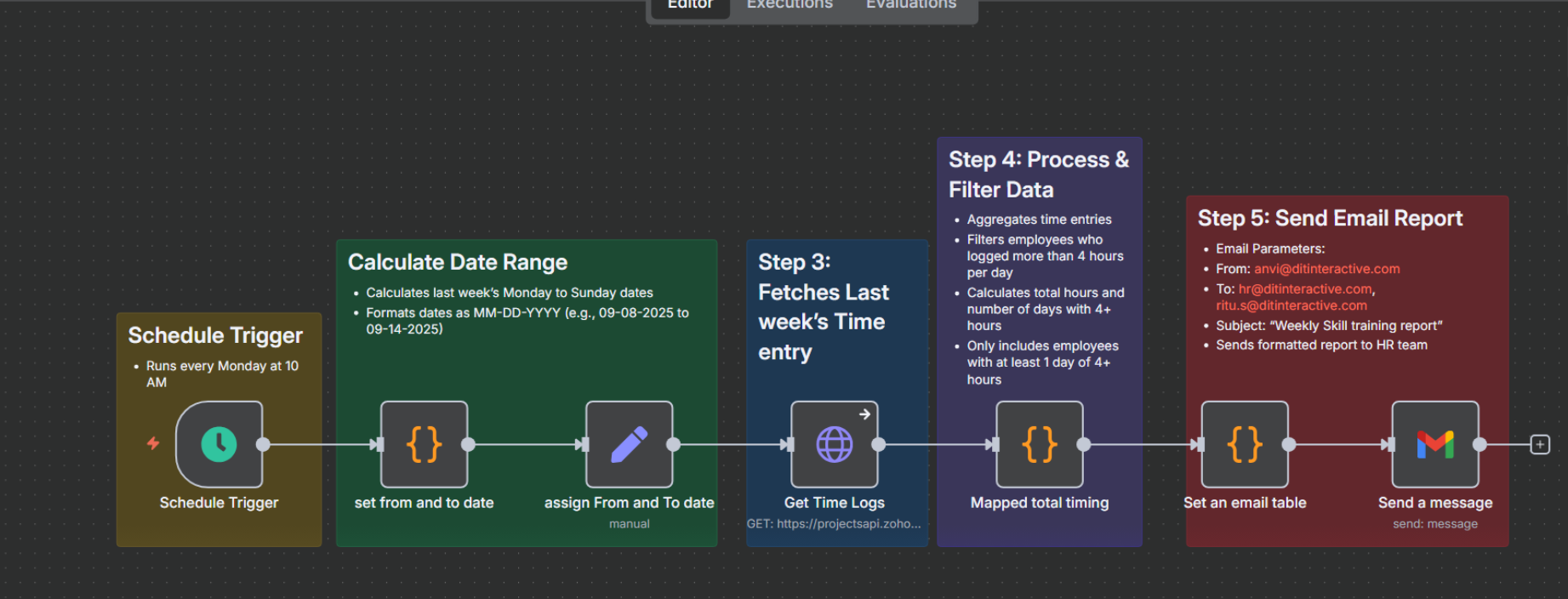
Weekly Schedule Trigger
The automation runs automatically every Monday at 10:00 AM, ensuring the HR team receives the report at the start of the week without any manual effort.
Date Range Calculation
A script calculates the previous week’s dates (Monday to Sunday) and formats them to be compatible with Zoho Projects, ensuring accurate weekly reporting.
Zoho Projects Data Retrieval
The workflow connects to the Zoho Projects API and fetches all time logs for the calculated date range, focusing on task-related entries to capture employee activity accurately.
Skill Training Filtration
The system filters the data to include only skill training entries. It calculates total weekly hours per employee and flags days with over 4 hours of training to highlight high-intensity sessions.
Email Table Generation
The filtered data is converted into a professional HTML table containing employee names, IDs, total weekly hours, and high-intensity training days.
Automated Email Delivery via SMTP
The final report is sent directly to HR via email, providing a clear summary of weekly training activity and removing manual report preparation.
Workflow Diagram
The Impact
Saved Valuable Time
HR no longer spends hours manually compiling weekly training reports—automation saves 6–8 hours every week.
Eliminated Errors
Automated data retrieval and calculations ensure 100% accuracy in training hours reporting.
Improved Visibility
HR receives consistent, timely reports every week, providing clear insights into employee training activity.
Scalable Process
The workflow can handle any number of employees or projects without adding operational overhead, making reporting fully scalable.
Before vs After Snapshot
| Activity | Before Automation | After AI Workflow |
|---|---|---|
| Data Collection | Manually pulled time logs from Zoho Projects; time-consuming | Automatic API fetch of latest employee training hours |
| Report Generation | Weekly Excel reports, prone to delays | Ready every Monday morning, delivered automatically via email |
| Error Rate | High due to manual calculations and copy-paste | Near 0%, calculated directly from raw API data |
| HR Visibility | Delayed 2–3 days; limited overview of training activity | Immediate, complete overview of all employee training hours |
| Follow-Up & Reminders | Manual reminders; inconsistent | Automated alerts sent to HR for missing or high-intensity training logs |
| Archived Records | Tracked inconsistently | Logged automatically in master Google Sheet for record-keeping |
| Compliance Check | Manual and prone to misses | Fully automated and accurate |
Automate Your Weekly Training Reports
Automatically collect, calculate, and generate accurate training reports — delivered on time, every week.