
Automated Follow-up for Pending & Review Tasks
An automated workflow that monitors task status duration and sends timely follow-up reminders without manual tracking.
Client / Department Overview
Client Type
IT companies,Marketing agencies,Consulting firms,Remote teams,Startups,Enterprises
Department
Project Management
Tools Involved
Zoho Projects, Google Sheets & Gmail API, N8n
The Challenge

The project management team struggled to monitor tasks that remained in Pending and Review statuses across multiple active projects.As project volume increased, ensuring timely follow-ups became difficult and inconsistent.
Key Pain Points
-
1
Lack of Centralized Status Monitoring
-
2
Heavy Manual Effort for Daily Monitoring
-
3
High Risk of Missed or Delayed Follow-ups
-
4
Delayed Reviews & Client Responses
The Automation Solution
To eliminate manual tracking and inconsistent follow-ups, we built Auto Follow-up for Pending & Review Tasks, a fully automated, rule-based workflow that monitors task status duration and sends timely reminders without human intervention. The automation integrates n8n as the workflow engine, Zoho Corporation (Zoho Projects API) for task data, and Google (Google Sheets & Gmail API) for data handling and email delivery.
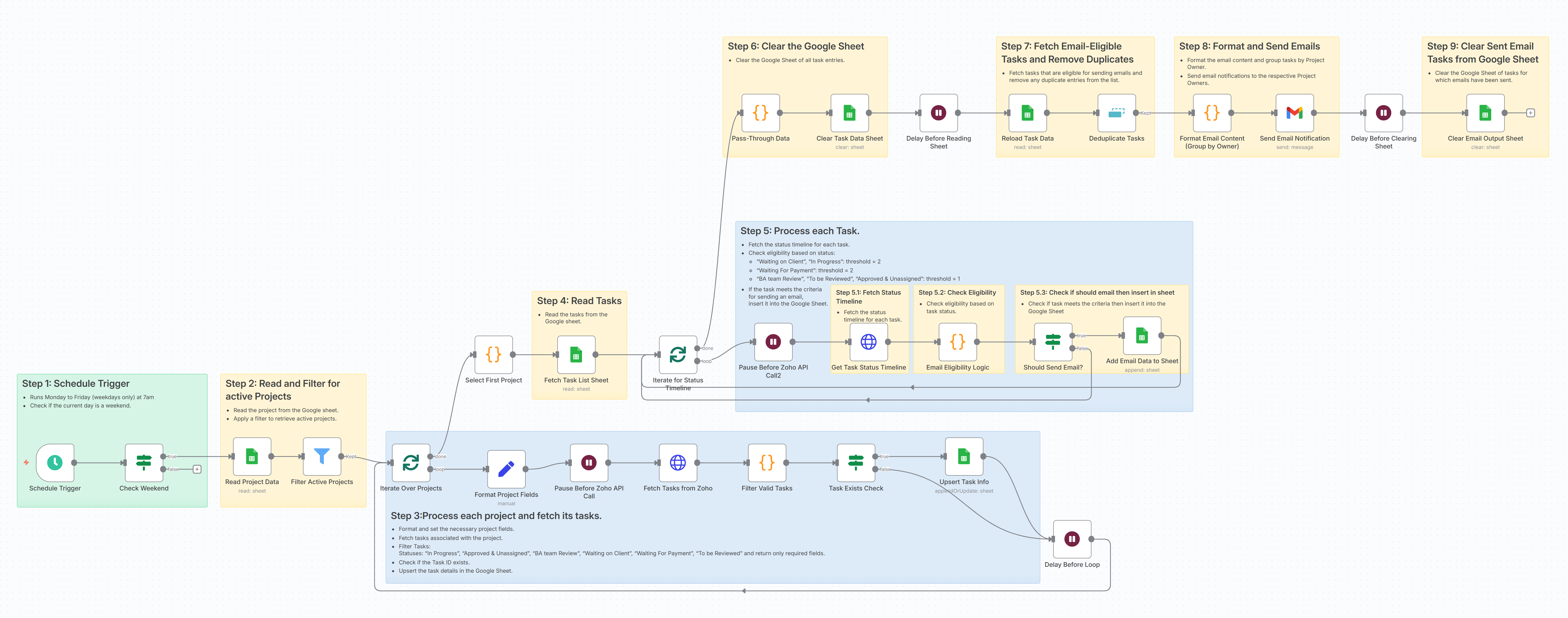
Scheduled Trigger
The workflow runs automatically every weekday morning using n8n’s Schedule Trigger. Weekends are excluded to align with business operations. This ensures consistent daily monitoring without requiring any manual initiation.
Reading Active Projects
At the start of each run, the system fetches project data from a centralized Google Sheets input file. Only projects marked as “Active” are considered for processing, ensuring that closed or inactive projects are excluded from the workflow.
Fetching Project Tasks
For every active project, the automation connects to Zoho Projects via API and retrieves the list of associated tasks. This allows the system to dynamically evaluate real-time task data without manual checks.
Filtering Relevant Task Statuses
From the complete task list, only tasks in critical statuses such as Waiting on Client, BA Review, or Payment Pending are filtered. These are the statuses that typically require follow-up or escalation. The filtered tasks are temporarily stored for evaluation.
Status Duration Tracking
The workflow then retrieves the status history of each filtered task and calculates how long it has remained in its current status. This duration tracking forms the core logic of the system and enables data-driven follow-up decisions.
Rule-Based Eligibility Check
Business rules are applied to determine whether a reminder should be sent. For example, tasks pending for two or more days trigger client reminders, while tasks in review for one or more days trigger internal notifications.Only tasks meeting these predefined conditions move forward in the workflow.
Email Preparation and Delivery
Eligible tasks are grouped by task owner to prevent multiple scattered emails. A consolidated reminder email is generated for each owner and automatically sent through Gmail API. This ensures structured and professional communication.
Cleanup and Reset
After emails are successfully sent, temporary logs and task records are cleared from Google Sheets. This ensures the system starts fresh during the next scheduled run and avoids duplication.
Workflow Diagram
The Impact
Increased Operational Efficiency
Manual daily monitoring of pending and review tasks was eliminated, significantly reducing coordination effort and freeing up team bandwidth for higher-value work.
Faster Review & Client Response Cycles
Automated, rule-based reminders ensured that tasks did not remain stuck unnoticed, improving turnaround time and keeping projects moving consistently.
Improved Accountability & Visibility
Owner-wise grouped reminders created clear responsibility, making it easier to track pending actions and reduce bottlenecks across projects.
Scalable & Standardized Process
The workflow established a structured follow-up system that can handle increasing project volume without adding operational overhead, making the process reliable and scalable.
Before vs After Snapshot
| Activity | Before Automation | After AI Workflow |
|---|---|---|
| Task Monitoring | Manual checking of each project in Zoho Projects time-consuming | Automatic API-based monitoring of all active projects daily |
| Status Tracking | No tracking of how long tasks stayed in a status | Automatic status-duration calculation for every task |
| Follow-up Process | Manual reminders via email or chat; inconsistent | Rule-based automated reminders sent to task owners |
| Missed Tasks | High risk of tasks remaining unnoticed for days | Zero unnoticed pending or review tasks |
| Email Communication | Multiple scattered emails; duplication risk | Consolidated, owner-wise grouped reminder emails |
| Operational Effort | 1–2 hours daily spent on monitoring | Fully automated weekday execution |
| Scalability | Difficult to manage as project volume increased | Easily scalable without additional manual effort |
Key Features
Automated Status Duration Tracking
Continuously monitors how long tasks remain in Pending or Review statuses using real-time API data.
Rule-Based Reminder Logic
Triggers follow-up emails automatically based on predefined business rules (e.g 1-day review, 2-day pending).
Owner-Wise Consolidated Notifications
Groups tasks by responsible owner and sends structured, single reminder emails to avoid duplication.
Weekday Auto-Execution with Clean Reset
Runs automatically every business day and clears temporary logs to ensure accurate, duplicate-free execution.
Automate Your Project Follow-ups
Stop chasing pending and review tasks manually.