
Automated Client Update Emails Without Manual Follow-Ups
A fully automated system that sends approved update emails to the clients personalized, tracked and duplicate-free.
Client / Department Overview
Client Type
IT & E-commerce Solutions Company
Department
Sales Operations & Customer Success
Tools Involved
n8n, Google Sheets, SMTP Email Server
The Challenge

The product and operations team struggled to manage client update emails efficiently whenever new theme releases were approved. The process involved multiple manual checks, copy-pasting, and tracking across sheets, making communication inconsistent and difficult to control.
Lack of Centralized Communication Tracking. Theme approvals, client lists, email templates, and sent status were maintained in separate sheets. There was no single system to track which clients had been notified and which were still pending.
Key Pain Points
-
1
Heavy Manual Effort for Every Release
-
2
High Risk of Duplicate or Missed Emails
-
3
Delayed Client Notifications
-
4
Limited Scalability
The Automation Solution
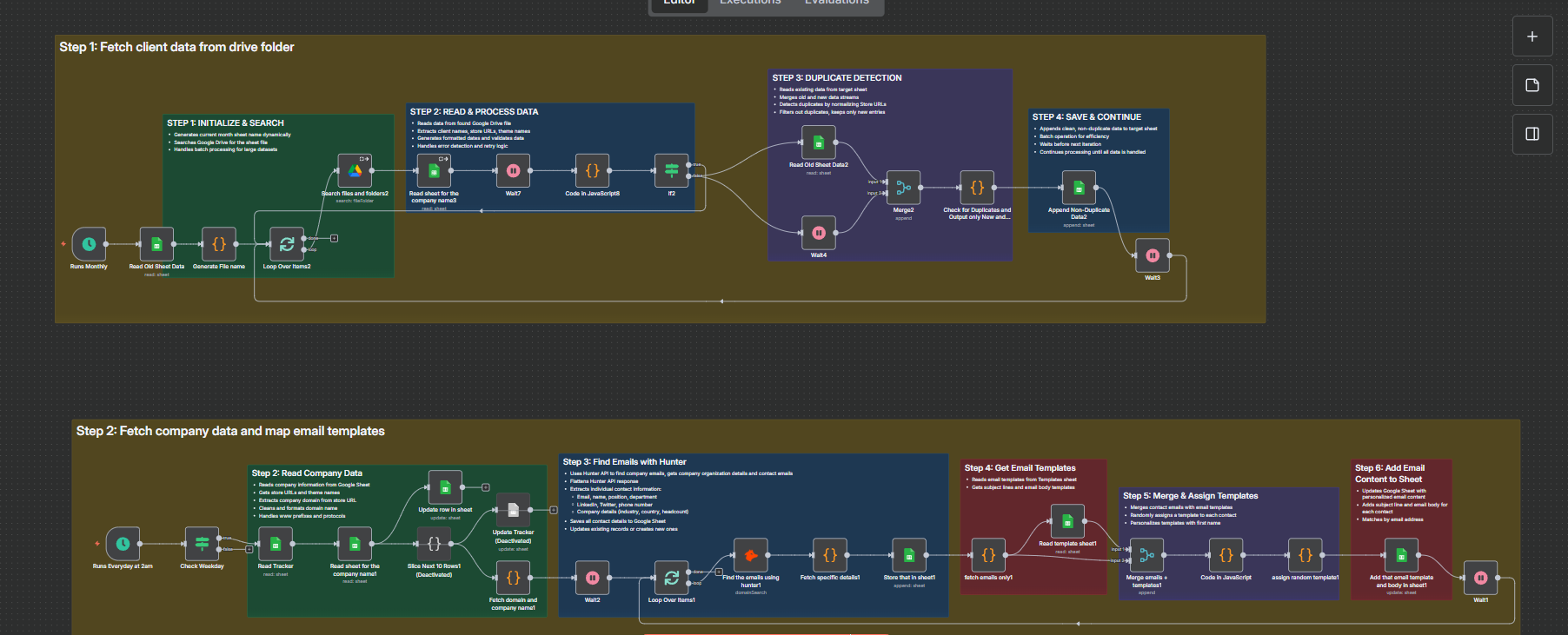
A fully automated, approval-based email workflow was built to manage client update communication from theme approval to confirmed delivery. Google Sheets acts as the control center, while the automation handles validation, personalization, dispatch and tracking without manual intervention.
Centralized Release & Client Control
Google Sheets serves as the single source of truth for theme approvals, email templates, customer mapping, and delivery status. The workflow runs daily at 6 PM IST, extracting only approved and unprocessed themes while automatically skipping previously handled entries. This ensures complete visibility and eliminates duplicate processing.
Approval-Based Filtering Logic
The system validates each theme by checking approval status and confirming that emails have not already been sent. This guarantees that communication is triggered only after authorization and prevents premature or repeated email dispatch.
Client Mapping & Data Structuring
For each approved theme, the workflow retrieves the associated clients and merges theme details with client information. This creates a structured, ready-to-send personalized email entry for every relevant customer, ensuring accurate targeting.
Dynamic Personalization
Using logic-based placeholder replacement, variables such as {{ Name }} are automatically converted into the client’s actual name. This enables scalable, personalized communication without manual editing.
Outreach Tracking & Controlled Dispatch
All personalized emails are first logged into an Outreach sheet, which acts as a live tracking and delivery queue. The system then sends only unsent emails in a controlled loop with a 30-second delay between sends to reduce spam risk and protect sender reputation.
Automatic Status Updates
After each successful email, the system updates the status and records a timestamp. The theme is also marked as processed, ensuring clean tracking and zero duplicate sends.
Workflow Diagram
The Impact
Significant Time Savings
The automation eliminated repetitive manual email preparation and tracking, saving several hours per release cycle. The team no longer needs to manually identify clients, personalize emails, or update logs.
Zero Duplicate or Missed Emails
With built-in approval validation and status tracking, the system ensures that emails are sent only once and only to the correct clients. This improved reliability and strengthened client trust.
Faster Client Communication
Approved updates are now communicated automatically on schedule, reducing delays between theme release and client notification. This improves responsiveness and enhances the overall client experience.
Scalable & Controlled Process
The workflow is designed to handle growing numbers of themes and clients without increasing workload. As operations scale, the system continues to function efficiently without adding complexity or manual effort.
Before vs After Snapshot
| Activity | Before Automation | After AI Workflow |
|---|---|---|
| Theme Approval Tracking | Manually checked sheets to identify approved themes | Automatically filters and processes only approved themes |
| Client Identification | Manually searched and matched clients for each theme | Automatically maps clients linked to the approved theme |
| Email Personalization | Manual copy-paste of names and content | Dynamic placeholder replacement for each client |
| Email Sending | Sent individually, risk of missing or duplicate emails | Controlled automated dispatch with duplicate prevention |
| Communication Tracking | Updated sheets manually, prone to errors | Automatic status updates with timestamps |
| Spam & Delivery Control | No delay control; risk of throttling | Built-in delay between emails to protect sender reputation |
| Scalability | More themes = more manual workload | Handles increasing themes and clients without added effort |
| Visibility & Audit | Limited tracking and unclear email history | Complete outreach log with clear delivery status |
Key Features
Approval-Triggered Automation
Emails are sent only after a theme is officially marked as approved. The built-in validation logic ensures that no communication is triggered prematurely, maintaining full operational control and reducing the risk of errors.
Dynamic Client-Level Personalization
Each email is automatically personalized using logic-based placeholder replacement.Client details such as name and theme association are dynamically inserted, ensuring professional and customized communication at scale.
Duplicate Prevention & Smart Tracking
The system validates sent status before processing and updates records immediately after delivery. This guarantees zero duplicate emails and provides a clear, auditable outreach history.
Controlled & Scalable Email Dispatch
Emails are sent in a structured loop with delay protection to prevent spam issues and SMTP throttling. The workflow is designed to scale efficiently as the number of themes and clients increases.
Automate Your Client Update Emails
Eliminate manual follow-ups and send approved updates automatically.