
Automated Blog Performance Reporting
Automated end-to-end blog performance reporting across SEO and engagement metrics using a unified workflow.
Client / Department Overview
Client Type
Digital Marketing Services Company, Growth Marketing Agency , IT services provider
Department
SEO & Content Analytics
Tools Involved
WordPress API, Google Search Console, Google Analytics 4 (GA4), Google Sheets, n8n
The Challenge

The marketing team lacked a single, reliable view of blog performance reporting. Because SEO and engagement data was spread across multiple platforms, reporting delays and inconsistencies became common leading to poor visibility and slower decision-making.
Key blog metrics such as organic clicks, sessions, engagement time, and publish dates were scattered across different tools. Without a consolidated view, it was difficult to understand the true performance of individual blog pages for a given reporting period.
Key Pain Points
-
1
Heavy Manual Work Every Month
-
2
Slow, Error-Prone Reporting
-
3
Inconsistent Metrics & Calculations
-
4
Lack of Centralized Blog Performance Visibility
The Automation Solution
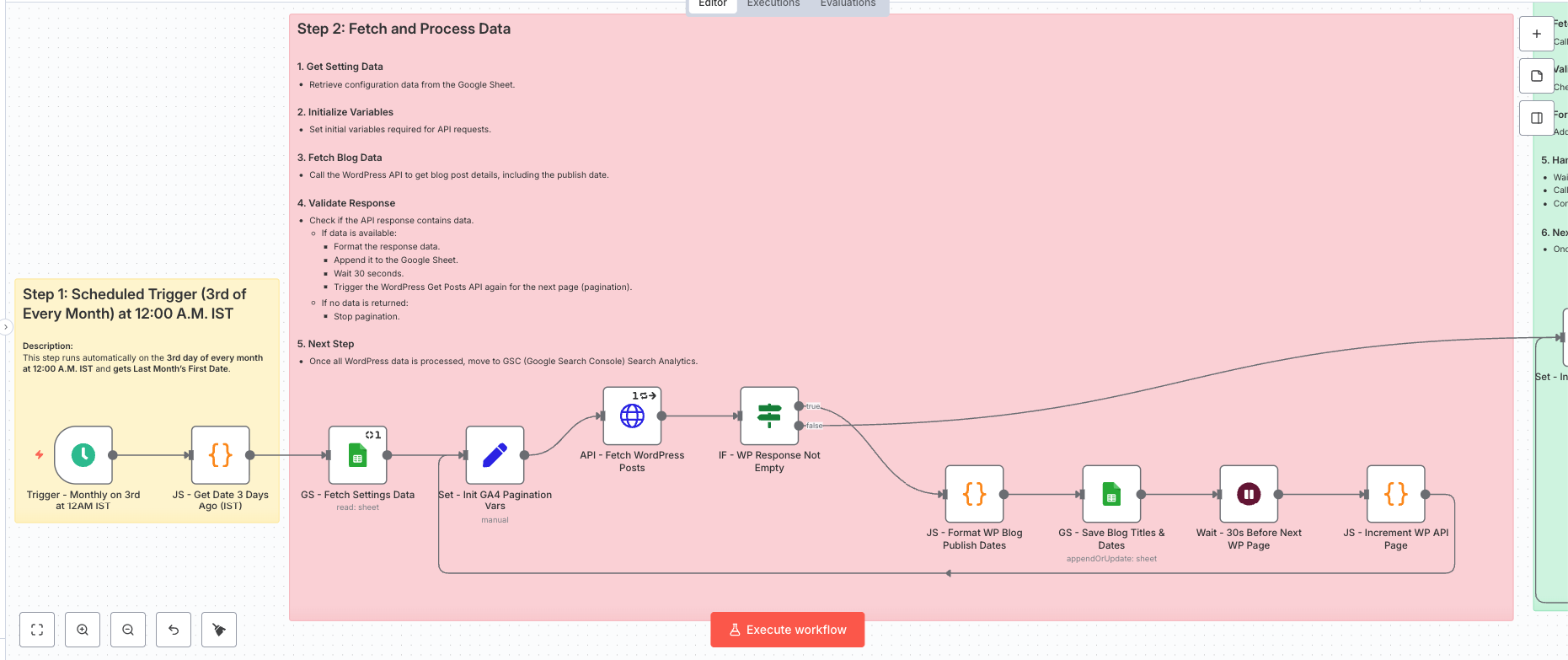
We built an end-to-end automation in n8n that functions as a monthly Automated Blog Performance Reporting system. The workflow pulls blog data from WordPress API, SEO metrics from Google Search Console, and engagement data from Google Analytics 4, then processes
Monthly Trigger
At the start of each month, the workflow triggers automatically and dynamically calculates the previous month’s reporting date range. This ensures that blog performance reports are generated consistently and on time without requiring any manual execution or configuration changes.
Blog Inventory Sync (WordPress)
The workflow connects to the WordPress API and fetches all published blog posts using pagination. For each blog, the system captures the blog URL and publish date and stores them in a central reporting sheet, creating a reliable master inventory of all blog pages to be tracked.
SEO & Engagement Data Fetching
Once the blog inventory is prepared, the automation pulls page-level organic click data from Google Search Console and engagement metrics such as sessions and engagement duration from Google Analytics 4. All data is fetched specifically for the selected reporting period to maintain accuracy and relevance.
Automatic Metric Mapping & Updates
The automation uses intelligent URL normalization and matching logic to map SEO and engagement metrics to the correct blog pages. If a blog page already exists in the report, its metrics are updated. If the page is not yet present in the inventory, it is safely skipped to prevent duplicate or incorrect entries.
Central Dashboard Logging
After processing, all validated metrics are written into a master Google Sheet. This creates a continuously updated dashboard that maintains a historical view of blog performance, allowing teams to track trends and page-level growth over time.
Error Handling & Logging
Any API errors, missing data, or unexpected responses are automatically logged with timestamps in a separate sheet. This ensures the workflow remains stable and allows quick troubleshooting without interrupting scheduled runs.
Logic-Driven, Not Raw Data
Rather than storing raw API dumps, the workflow applies logic-driven processing such as dynamic date handling, URL normalization, pagination control, and cross-platform data consolidation. This ensures the final report is clean, consistent, and ready for decision-making.
Workflow Diagram
The Impact
Significant Time Savings
The automation eliminated manual data exports and spreadsheet work, saving the team 8–10 hours every month and allowing analysts to focus on optimization instead of reporting.
Accurate & Consistent Reporting
By standardizing data sources, date ranges and calculations, the system delivered consistent, error-free metrics across all reports, increasing trust in SEO and performance data.
Faster SEO Decision-Making
With reports generated automatically at the 0start of each month, stakeholders gained timely visibility into blog performance, enabling quicker action on high-performing and underperforming content.
Scalable, Low-Maintenance System
The centralized configuration and logic-driven workflow made it easy to scale the reporting system across multiple websites with minimal ongoing maintenance.
Before vs After Snapshot
| Activity | Before Automation | After AI Workflow |
|---|---|---|
| Data Collection | Manual exports from WordPress, GA4 and Google Search Console; time-consuming | Automatic API-based data fetch from all platforms |
| Report Generation | Monthly spreadsheet preparation with manual URL matching | Monthly report generated automatically and updated in Google Sheets |
| Error Rate | High due to copy-paste, mismatched URLs, and manual formulas | Near 0%, calculated directly from normalized API data |
| SEO Visibility | Fragmented data across tools; no single source of truth | Centralized blog performance dashboard with page-level insights |
| Decision-Making Speed | Delayed by several days due to manual reporting | Insights available immediately at the start of each month |
| Scalability | Hard to manage as blog count increases | Scales effortlessly across large blog libraries |
| Historical Tracking | Inconsistent and difficult to maintain | Automatically logged and maintained in a master Google Sheet |
Key Features
Centralized Blog Performance Dashboard
All blog URLs, publish dates, organic traffic, and engagement metrics are consolidated into a single Google Sheets dashboard, providing a clear and reliable source of truth.
Fully Automated Monthly Reporting
The workflow runs on a fixed monthly schedule, automatically pulling, processing, and updating blog performance data without any manual intervention.
Intelligent URL Matching & Data Normalization
Built-in logic ensures accurate mapping of SEO and engagement metrics to the correct blog pages, preventing duplicates and mismatched data.
Scalable & Error-Resilient Architecture
Pagination handling, rate-limit control, and error logging make the system stable and scalable across large blog libraries and multiple websites.
Automate Your Blog Performance Reporting
Take control of your blog analytics—without manual reporting.